Tag: Alternative apps

  • Wondr Note: Fun Notes & Tools — Comprehensive App Review & Evidence-Based Report

    Wondr Note: Fun Notes & Tools — Comprehensive App Review & Evidence-Based Report

    Important scope note on identity confusion: During research, several unrelated products share the “Wondr” name and must not be conflated with this app: Wondr Health / Naturally Slim (a weight-loss program), Wondr AI (a print-on-demand SaaS tool), and Wondr Care (a shampoo-bar brand). This report concerns only Wondr Note: Fun Notes & Tools by Mighty Bear Vibes Pte. Ltd. Where evidence about those other products appears, it is excluded from the verdict. This significantly limits the volume of app-specific evidence available, which is itself a finding.

    1. Overview

    Wondr Note is a customization-heavy notes and productivity app for Android. It combines the simplicity of a notebook with the flexibility of customization and a daily planner, so you can create, plan, write, and dream in one place — whether it’s a shopping list, study notes, or travel checklist. It is described as a creative and unique take on a note and list app, created in the hopes of providing convenience, productivity and visual appeal, letting users add notes, lists, boards, basic accounts and even countdowns.

    The current version is 17.x (as of early-to-mid 2026), developed by Mighty Bear Vibes Pte. Ltd. Wondr Note has won an award for Best New Mobile App (from the Best Mobile App Awards, a self-submission awards program — treat as marketing, not independent validation).

    Evidence-quality caveat: There is very little independent, in-depth review coverage of this specific app. The most substantial third-party review (noteapps.ca) is from January 2023 and much has changed since. Most other “sources” are app-store mirrors (APKPure, Uptodown, Softonic) that republish the developer’s own description. Treat many claims below as developer statements or dated user opinion, not verified fact.

    2. Onboarding Experience
    Wondr Note app review graphic

    Direct, documented onboarding evidence is thin. Based on the app’s design and feature description:

    • Account creation / login: The app is local-first and the developer repeatedly states data stays on-device, implying no mandatory account to start. The developer states your data stays private on your device — they never collect or store your notes, email, name, etc. A Google account is only relevant if you opt into Google Drive backup.
    • Time to productivity: Multiple user reviews indicate a quick, low-friction start. One reviewer noted becoming a fan on day one. Another said that after starting the same day, it was by far their favorite notepad-type app despite trying many others, and that they were not paying for premium, praising the choices to customize font colors and backgrounds.

    Assessment: Onboarding appears low-friction (no forced signup), but there is no strong evidence of guided tutorials, and at least one user felt basic behaviors weren’t obvious (see §4). Onboarding quality: moderate-to-good, unverified.

    3. User Interface & User Experience

    This is the app’s strongest, most consistently praised dimension.

    • A 2023 independent reviewer said they enjoyed testing Wondr Note as it’s extremely colorful, fast, and functional.
    • Recent update notes emphasize UI polish: the developer highlights a sleek, modern UI, an upgraded planner and calendar, reminders, and sort/filter/multi-select tools for quicker organizing.
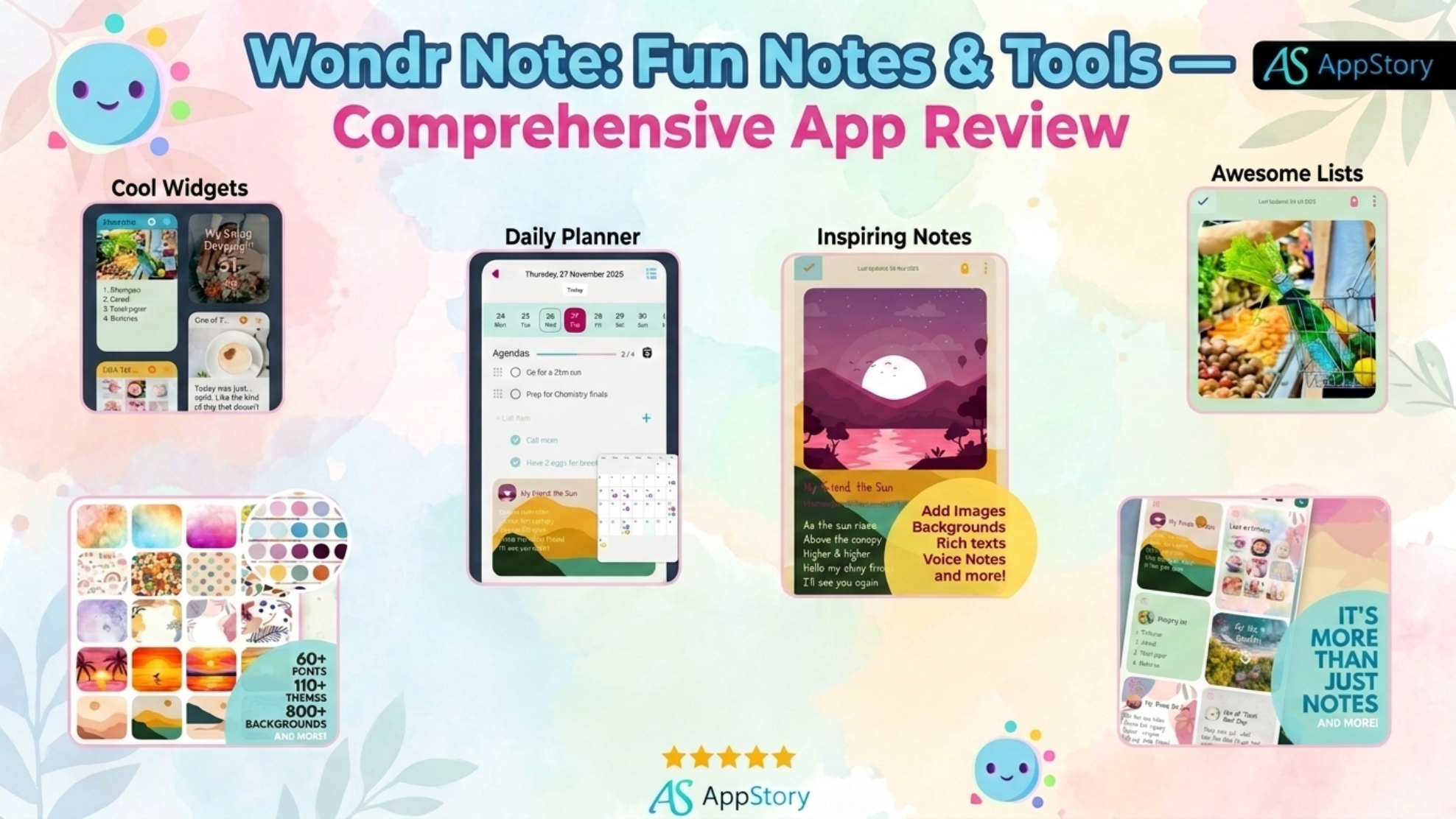
    • Deep customization is the headline feature: the app advertises 800+ beautiful backgrounds, 100+ cute themes, 70+ fonts, and the ability to create and save your own custom theme. (Note: earlier versions advertised far fewer — around 60+ themes, 400+ backgrounds and 70+ fonts — showing the library has grown over time.)

    UX friction points (user-reported):

    • One user found basic functions missing — being unable to switch a note between list/checklist/text while writing, calling the per-note restriction limiting.
    • The same user couldn’t find ways to turn off autosave, import notes from other apps, or change view settings beyond colors.
    • Another user’s only complaints were a short length limit per note and glitchy copy-and-paste behavior.

    Assessment: Visually excellent and easy to navigate for casual use; weaker on power-user flexibility (note-type switching, imports, view settings).

    4. Core Features & Performance

    FeatureWhat it doesNotes
    Notes & to-do listsAdd images, backgrounds, or voice notes; switch between checklist, numbered or bulleted formats; rich text with bold, highlight, color and italics.Format is chosen per note, which some users dislike
    Daily planner / agendaCreate a daily agenda by picking from open tasks across all your task lists. Recently upgraded with calendar + remindersPositioned as a 2025–26 focus area
    Accounts (expense tracker)Tracks income and expenses with details and automatic totaling.Praised as well-implemented
    Mood boardsA mood board where you can add a collection of photos with captions and a title.Historically a premium feature
    CountdownsPick a date, set a title, choose a background and get a countdown timer.Historically a premium feature
    WidgetsCustomizable home-screen widgets for the above.A recent update specifically included a widget bug fix
    Search / organizeSort, filter, tag and search to find items quickly.
    SharingShare individual notes as HTML from within the app, but there’s no bulk export.See §6 limitations

    Performance: The 2023 tester found it “extremely colorful, fast, and functional.” Recent changelogs claim performance improvements, a widget bug fix, and smoother loading and faster transitions.

    Key feature limitations / common complaints:

    • No real-time collaboration or sync between devices. A user wanted a shared, synchronized shopping list across family members’ phones but found the app can’t do this — no collaborative editing, only sharing a text of the list with no syncing.
    • No note-type switching mid-note; no import (see §3).
    • No bulk export (see §6).

    5. Pricing & Transparency

    ⚠️ Contradictory evidence — pricing model appears to have changed over time:

    • One-time / lifetime model (current signals): A recent Google Play review states there is lifetime access for a really good price. An older AlternativeTo entry listed it as a freemium product with a one-time perpetual-license purchase costing up to about $3, plus a free version with limited functionality.
    • Subscription model (also documented): The app’s own Terms & Conditions describe recurring billing: monthly subscription fees are billed automatically until cancelled via the Google Play Store; you must cancel before renewal to avoid the next charge; and refunds are not granted for partial-month usage. The same terms describe an annual equivalent. Restore-after-device-change is supported: if you change your device, you may restore your purchase by visiting the “Premium” page in the app, and it will be automatically restored.
    • A dated third-party figure of “$10/mo for Pro” appears in the 2023 noteapps.ca review — it describes a generous free plan or $10/mo for a Pro plan — but this figure is old and inconsistent with the low one-time price other sources cite, so treat it skeptically.

    Free vs. premium split (historically): The free tier is genuinely usable — multiple reviewers explicitly use it without paying. One user noted the free version does notes, lists, daily agenda and the Account tracker very well, with mood boards and countdowns behind premium. Older data suggested around 20 free themes plus 20+ more premium themes.

    Transparency assessment: Mixed. The free tier is honest and generous, and refund/renewal rules are documented in the Terms. However, the coexistence of subscription language and lifetime/one-time messaging is confusing, and no source cleanly confirms today’s exact price and plan structure. Verify the live price in Google Play before purchasing. No credible reports of unexpected/hidden charges specific to this app were found.

    6. Offline Functionality

    This is a structural strength given the local-first design.

    • The app is local-first with backup and restore from Google Drive. Core note-taking, lists, accounts, countdowns and mood boards are stored on-device, so they work offline.
    • Internet is needed only for: Google Drive backup/restore.
    • Sync limitation: Because there is no cross-device cloud sync (§4), “offline” is really the default state — there’s no live syncing to fall out of. Data can only be restored from Google Drive via the app.

    Assessment: Excellent offline usability for a single-device workflow; poor for anyone needing multi-device continuity.

    7. Battery Consumption

    No specific, credible battery-drain data or user complaints were found for Wondr Note. As a local-first notes app without heavy background sync, battery impact is likely low, but this is an inference, not verified evidence. The app’s own reminders/widgets could contribute minor background activity. Insufficient evidence for a scored rating.

    8. Storage Requirements

    • Install size: A 2024 build (v12.8) had a download size of about 107.1 MB (released April 7, 2024 by Mighty Bear Vibes Pte. Ltd.). Current versions are likely similar or larger given the expanded theme/background library.
    • Growth driver: The 800+ backgrounds, 100+ themes and attached images/voice notes are the main storage consumers; note attachments (photos, mood boards) grow storage with use.
    • No specific user complaints about storage bloat were found.

    Assessment: Moderate footprint for the category (~100 MB+), largely due to bundled visual assets. Reduce usage by limiting image/voice attachments.

    9. Customer Support

    • Channel: Support appears to be primarily via the developer’s website/email. Historically, responsiveness was praised: one reviewer said the developers are kind and respond very quickly.
    • ⚠️ Reliability/availability concerns: A recent Play review reported the developer’s site was down: a user wanted to message the devs but the Mighty Bear website showed a “Critical Error,” and suggested the devs look into it.
    • Developer visibility: The 2023 independent reviewer flagged an absentee-developer pattern: they couldn’t find the people behind the app, noted the Twitter account was “a ghost town,” and that Facebook and the blog had no updates for 1.5 years.

    Assessment: Support quality reports are positive but sparse and dated, undercut by signs of low public engagement and at least one broken support-site report. Community support is essentially nonexistent (no active forum/subreddit found).

    10. Data Privacy & Security

    This is a genuine strength, though claims are largely self-reported.

    • Data collection: The developer states your data stays private on your device and that they never collect or store your notes, email, name, etc. An older listing added a nuance: you own all your data, it’s stored in internal storage inaccessible to other apps, no personal data like email/name/images is stored on their servers — but they do collect crash and usage data to improve the app.
    • On-device security: Notes are encrypted and stored on the device, with a PIN lock for extra security.
    • Backups: The developer does not back up data on their servers; they provide a service to back up to your chosen Google Drive account — and if you uninstall the app, your data is removed and cannot be recovered. This is an important data-loss risk to understand.
    • Independent take: The 2023 reviewer called the privacy policy “great, simple, and clear.”

    No historical privacy controversies were found for this specific app. (The billing/third-party-text complaints in search results belong to Wondr Health, a different company, and do not apply here.)

    Privacy risk assessment: LOW — local-first architecture with on-device encryption and minimal server collection is favorable. Caveats: claims are self-reported (not independently audited), crash/usage analytics are collected, and uninstalling wipes your data, so backups are essential.

    11. Bug History & Reliability

    • Update cadence: Recent version history shows frequent updates — Uptodown lists releases including v16.2/15.8 in August 2025, 16.4 (Aug), 16.5 (Oct), 16.6 (Nov 25), 16.8 (Dec 7, 2025) and 17.0 on Feb 16, 2026 — all requiring Android 8.1 or higher. This contradicts the older “abandoned/inactive developer” narrative from 2023 and suggests active development resumed.
    • Known bugs (documented): a widget bug (fixed in a recent update per changelog); a short per-note length limit and glitchy copy-and-paste; and a niche Samsung DeX cursor up/down issue.
    • Stability trend: Recent changelogs repeatedly cite more performance improvements, additional bug fixes, and smoother loading and faster transitions.

    Assessment: Improving reliability trend. Development is currently active (frequent 2025–26 releases), reversing the earlier dormancy. Bugs reported are minor/cosmetic rather than data-destroying.

    12. Community Sentiment

    ⚠️ Sentiment data is limited and skewed by name-collisions. Reliable Wondr Note-specific opinions come mainly from Google Play reviews and the single 2023 noteapps.ca review. Third-party aggregators like Uptodown show zero reviews (“There are no opinions about Wondr Note yet. Be the first!”), and there is no meaningful Reddit/Trustpilot presence for this app.

    Most common praises:

    • Beautiful, customizable design and it’s fun to use (multiple reviewers).
    • Genuinely useful free tier; all-in-one (notes + lists + planner + accounts + boards + countdowns). One reviewer loved that it’s not just a planner but journal, lists and picture boards in one, with backup, plus lifetime access for a good price.
    • Fast and functional; responsive developers (historically).

    Most common complaints:

    • No cross-device sync/collaboration.
    • Per-note format lock; no import; limited view settings.
    • Short note length limit; occasional copy-paste glitches.
    • Low developer public visibility / a reported broken support site.

    Overall sentiment: Positive but low-volume. Enthusiastic core users, but too little independent data for a robust score.

    13. Competitor Comparison

    The best-rated Wondr Note alternative is ColorNote (free), with other similar apps being Note Yourself, Memo, Inquisite and hello ivy. The 2023 reviewer also benchmarked it against Obsidian.

    DimensionWondr NoteColorNoteObsidianGoogle Keep
    Design/customization★★★★★ (800+ backgrounds, 100+ themes)★★☆ (basic)★★★ (theme-able, markdown)★★★
    Core notes/lists★★★★ (rich, per-note format lock)★★★★ (simple, fast)★★★★★ (markdown, linking)★★★★
    Cross-device sync✗ (no live sync)✓ (account sync)✓ (paid/Git sync)✓ (Google account)
    Collaboration✗LimitedCommunity plugins✓ (real-time)
    Offline★★★★★ (local-first)★★★★★★★★★ (local-first)★★★ (needs sync)
    Export/portability✗ (single-note HTML only, no bulk)Limited★★★★★ (plain markdown)★★★
    Privacy★★★★★ (on-device, encrypted, PIN)★★★★★★★★ (local files)★★ (Google cloud)
    PricingFree + cheap premium (model unclear)Free (ads)Free personal; paid syncFree
    Extra toolsAccounts, mood boards, countdowns, planner—Plugins/graphReminders

    Takeaway: Wondr Note wins clearly on aesthetics/customization and all-in-one variety, and matches leaders on privacy/offline. It loses on sync, collaboration, and data portability, where ColorNote, Google Keep and especially Obsidian are stronger.

    14. Risk Assessment

    Major risks / deal-breakers:

    1. No cross-device sync or collaboration — a hard blocker for anyone using multiple devices or sharing lists live.
    2. Weak data portability — no bulk export to take your notes elsewhere; only single-note HTML sharing. Migrating away is painful.
    3. Data-loss risk on uninstall — if you uninstall the app, your data is removed and cannot be recovered unless you’ve backed up to Google Drive; and that backup is stored in a hidden app area on Drive that the tester couldn’t locate or extract without the app.
    4. Pricing ambiguity — subscription vs. lifetime messaging conflicts; confirm before buying.
    5. Developer/support uncertainty — a reported broken support site and historically low public visibility, though update frequency has recently improved.

    Avoid the app if you: need real-time sharing, multi-device sync, plain-text/markdown portability, or long/complex documents (note-length limits).
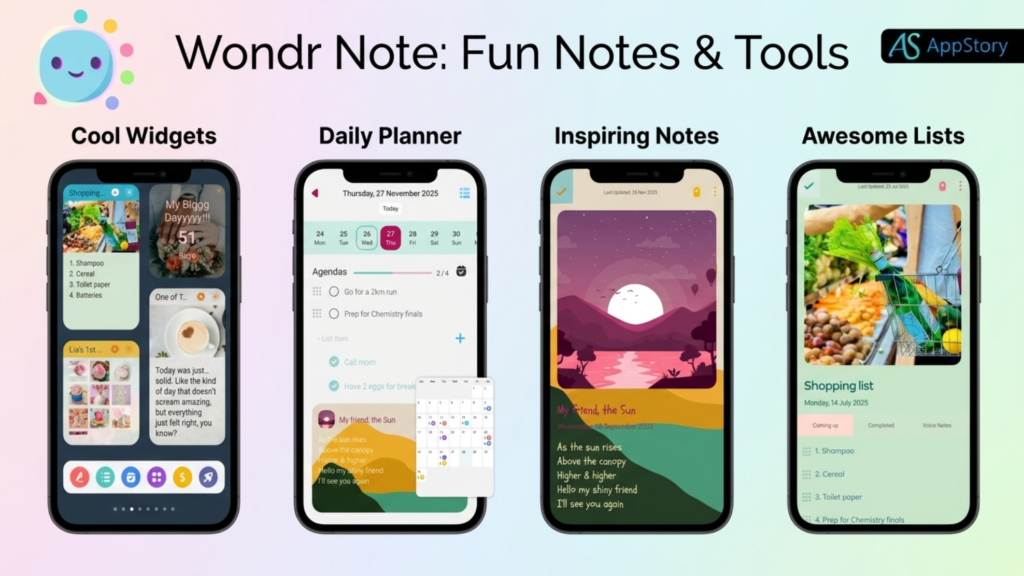
    Wondr Note interface showing screens for widgets, daily planner, inspiring notes, and awesome lists

    15. Final Verdict

    Overall score: 7 / 10

    Wondr Note is a delightful, privacy-friendly, single-device notes app that stands out for its extensive customization and genuinely fun, all-in-one design (notes, lists, planner, expense accounts, mood boards, countdowns, widgets). It’s backed by an active recent update cadence and a usable free tier. It is held back by no sync/collaboration, weak export, some flexibility gaps, and pricing/support ambiguity. Notably, the earlier “8/10 if the developer were more visible/active” reservation from the 2023 review has been partially addressed by frequent 2025–26 updates.

    • Best for: Students, journalers, hobbyists, list-makers, and anyone wanting a beautiful, offline-first, privacy-respecting notes app on a single Android device. It’s well-suited to a student, event planner, garage-sale goer, a parent with kids in sports/crafts, or a small business owner — basically anyone tracking their life, memories or hobbies.
    • Not recommended for: Multi-device users, teams needing collaboration, power users needing markdown/import/bulk export, or anyone writing long documents.
    • Key strengths: Best-in-class customization; strong privacy (on-device, encrypted, PIN); excellent offline use; varied all-in-one toolset; active updates.
    • Key weaknesses: No cross-device sync/collaboration; no bulk export; per-note format lock and note-length limits; unclear/confusing pricing; thin/uncertain support.
    • Value for money: High if it’s a cheap one-time/lifetime purchase; question it if billed as a recurring subscription — verify the live price first.
    • Long-term usability: Cautiously positive. Recent frequent updates are encouraging, but the lack of data portability is the biggest long-term concern — you can get into Wondr Note easily but not out easily.

    Recommendation: Worth installing and trying via the free tier, especially if you value aesthetics and on-device privacy on a single phone. Set up Google Drive backup immediately, and confirm the current pricing model in Google Play before paying. If cross-device sync, collaboration, or note portability matter to you, choose Google Keep, ColorNote, or Obsidian instead.

    Disclaimer: This review is based on publicly available information, user reports, and documented evidence gathered from multiple sources as of mid-2025. Individual experiences may vary. Prices, features, and policies are subject to change. This review is independent and not sponsored by Aceable or any competitor.

    Sources consulted: Apple App Store reviews, Google Play Store reviews, Reddit (multiple subreddits), Better Business Bureau, Trustpilot, Common Sense Media, Aceable’s official website and privacy policy, state DMV/DPS websites, technology review publications, and social media platforms.

    🌟 Community Discovery & Upvoting

    📱 Upvote 5 Community Apps ▾

    1-Click Free Upvote

    Support innovative mobile apps nominated for recognition. Cast your vote with one click to help emerging apps rise:

    Parent Sense: Daily Baby Care

    Parent Sense: Daily Baby Care
    Innovative app developed by Sense-IT Limited
    PicAid: AI Real Estate Photos
    PicAid: AI Real Estate Photos
    Innovative app developed by JOHN A BEATTY
    Valo: Meet People in Groups
    Valo: Meet People in Groups
    Innovative app developed by Bonbon Group Ltd
    SmartNews: Local Breaking News
    SmartNews: Local Breaking News
    Innovative app developed by SmartNews, Inc.
    Know Your Dosh: Money Tracker
    Know Your Dosh: Money Tracker
    Innovative app developed by Know Your Dosh Limited
  • Must-Have IoT Apps for Modern Retail Store Operations

    Must-Have IoT Apps for Modern Retail Store Operations

    Why IoT Is the New Retail Imperative

    Retail is undergoing a profound transformation as the physical storefront integrates with the digital world. By leveraging sensors, cameras, and connected devices, forward-thinking brands are moving away from manual, reactive management toward an interconnected ecosystem driven by real-time data. This shift, while fueled by emerging innovations in Internet of Things (IoT), artificial intelligence, and automation, is creating a new competitive baseline.

    The core promise of this technology lies in its ability to turn mundane physical interactions into structured data that drives smarter operational decisions. From smart shelf systems that track stock to real-time supply chain monitoring, these tools provide a granular view of retail performance that was previously unattainable. At Appstory.org, we see the primary opportunity for developers and founders in building the middleware and management dashboards that turn these raw sensor streams into actionable insights.

    Throughout this article, we will examine the critical layers of retail IoT, from the hardware powering storefronts to the essential security architectures required to protect consumer data. We will also address common implementation hurdles and look ahead to how 5G and autonomous store models are shaping the future of the industry.

    What IoT Really Means for Your Store

    Understand the four fundamental pillars of connectivity, data processing, user interface, and security to build scalable and market-ready IoT solutions for your retail stores.

    The Internet of Things (IoT) is a global network of interconnected physical devices that gather and exchange data via the internet, allowing them to interact with their environment and digital infrastructure. Beyond its operational base, IoT is categorized into four primary segments based on use case: Consumer IoT for personal wearables, Commercial IoT for business-scale operations, Industrial IoT (IIoT) for manufacturing and logistics, and Infrastructure IoT for large-scale urban or utility systems. By bridging hardware and digital analytics, IoT transforms raw sensor data into actionable insights that drive efficiency and automation. For founders and developers at www.appstory.org, understanding these categories and pillars is the first step toward building scalable, secure, and market-ready solutions.

    What are the core pillars of a functional IoT ecosystem?

    Effective IoT implementation relies on the four fundamental pillars of connectivity, data processing, user interface, and security. These ensure that devices maintain stable communication while adhering to safety and regulatory standards. www.appstory.org helps teams identify specific use cases that reduce latency or bandwidth costs by emphasizing localized data processing over cloud-only dependencies. By prioritizing these architectural pillars, developers can avoid the common trap of data silos and ensure their applications remain responsive in high-traffic retail environments.

    • Connectivity provides the communication layer between physical hardware like RFID tags and back-end databases.
    • Data processing converts high-frequency sensor inputs into meaningful metrics, such as real-time inventory counts or foot traffic patterns.
    • User interface components translate complex machine signals into dashboards that store managers can act upon immediately.
    • Security protocols, mandated by standards such as the IoT Cybersecurity Improvement Act of 2020, protect sensitive customer information from unauthorized access.

    From Manual to Data-Driven Store Management

    Retail operations have traditionally relied on manual logging and periodic inventory checks, leaving store performance vulnerable to human error and delayed updates. Transitioning to an IoT-enabled ecosystem replaces these reactive workflows with a continuous, digital nervous system. By embedding sensors across physical touchpoints, store managers can capture real-time signals regarding inventory levels, foot traffic density, HVAC conditions, and equipment health.

    This granular data serves as the foundation for broader operational optimization. Rather than guessing staffing needs based on seasonal norms, retailers can utilize predictive analytics to align labor schedules with actual occupancy patterns captured by people-counting sensors. These systems automatically flag when store traffic trends suggest a need for more assistance, ensuring that customer service levels remain stable during peak hours.

    For founders and app developers at www.appstory.org, the opportunity lies in designing middleware that transforms raw sensor input into actionable business logic. While legacy management systems often operate in silos, modern IoT architectures allow for automated, data-driven decisions that impact the bottom line directly. For example, automated inventory tracking via smart shelves can dynamically trigger replenishment orders, while energy systems adjust lighting and climate based on real-time occupancy to minimize overhead.

    This shift to proactive management is not just about efficiency; it is about adaptability. Real-time data streams provide the freedom to perform instant layout optimizations or price adjustments across an entire retail fleet. By bridging the gap between physical assets and digital intelligence, stores can finally operate with the speed and precision of mature e-commerce platforms, ultimately improving profit margins while delivering a more responsive experience for the modern shopper.

    Smart Shelves and RFID: The Inventory Backbone

    Transform your inventory management by leveraging RFID and smart shelving to gain real-time visibility and automate replenishment with high-velocity data processing.

    At the heart of the modern smart store lie smart shelves and RFID technology. These systems function together to provide a real-time digital map of physical inventory, effectively replacing manual logging with automated precision. By embedding sensors directly into display units, retailers can monitor stock levels, detect misplaced products, and identify goods nearing expiration without ever touching a clipboard.

    The secret to this scale is Ultra-High-Frequency (UHF) RAIN RFID tags. Unlike traditional barcodes that require a direct line of sight, these tags can be scanned from up to 12 meters away. High-performance readers can process over 1,000 unique items in a single second, allowing for near-instant inventory audits across entire store aisles.

    Industry giants are already proving the ROI of these systems. Target scaled RFID across its footprint to improve inventory accuracy, while Kroger integrated visual loss prevention and RFID to significantly reduce self-checkout shrinkage. Similarly, Old Navy utilizes radar-based systems across more than 1,200 locations to track assets, and Zara employs RFID tagging to streamline reverse logistics, turning returns into an automated process.

    For founders and developers building in this space, www.appstory.org offers deep dives into how to architect the middleware applications that turn these high-velocity sensor streams into clear inventory alerts. Because the sheer volume of data generated by thousands of tags can overwhelm legacy ERP systems, successful implementations focus on using edge processing to clean and structure data before it reaches the main business dashboard.

    Automated Checkout and Frictionless Payments

    The evolution of the retail checkout experience is moving toward a frictionless model that eliminates traditional lines entirely. By integrating IoT sensors, such as weight-sensitive shelving and overhead computer vision cameras, stores can now automatically track which products a customer selects. When combined with RFID tags, these systems ensure high-accuracy identification of items as shoppers navigate the aisles.

    The Amazon Go model pioneered this shift using a combination of cameras and sensors to monitor activity in real time. Once a shopper finishes their trip, the system signals their connected mobile application to complete the payment automatically upon exiting. Retailers at Appstory.org use these insights to build similar cashier-less experiences that increase throughput and reduce labor costs.

    This technology represents a major growth area for the industry, with the global smart checkout market projected to reach $17.28 billion by 2032, growing at 15.5% each year per 2024 Wavetec data. For developers building in this space, the primary challenge remains handling the massive data streams these sensors generate. Successful implementations rely on edge processing to maintain low latency during transactions, ensuring that payments are authorized the moment a customer leaves the store.

    Cold Chain and Environmental Monitoring

    For grocery retailers managing perishables, the integrity of the cold chain is a significant financial variable. Grocers lose an average of $70 million per year due to food spoilage, a figure that is largely preventable with real-time IoT temperature and humidity sensors. By installing specialized devices, store managers gain immediate visibility into fridge and freezer conditions. These sensors operate reliably even in freezing environments and use wireless protocols to maintain connectivity through dense infrastructure, replacing inconsistent manual logging procedures.

    Beyond inventory preservation, environmental monitoring sensors significantly influence the in-store experience. Sensors that track carbon dioxide, humidity, and temperature levels allow retailers to automate HVAC systems for optimal air quality and customer comfort. This data-driven approach does more than ensure a pleasant shopping environment; it simplifies reporting for HACCP compliance by providing a continuous, verifiable trail of climate data. Startups building software for AppstoryORG readers should focus their middleware applications on bridging the gap between raw sensor telemetry and intuitive dashboard alerts that notify staff of micro-fluctuations before spoilage occurs.

    People Counting and In-Store Analytics

    True store intelligence begins with understanding how shoppers navigate your physical space. By deploying occupancy sensors and AI-powered heatmaps, retailers can translate raw foot traffic into a precise record of customer behavior. These tools reveal more than just total entry numbers, as they map dwell times and movement patterns to identify both high-traffic hot spots and underperforming dead space. At Appstory.org, we emphasize that building applications to visualize this data is essential for founders looking to bridge the gap between sensor arrays and tactical store improvements.

    Data-driven managers are using these metrics to move beyond guesswork. By integrating occupancy data with Appstory.org resource-planning tools, you can dynamically adjust staffing levels or update cleaning schedules to ensure that maintenance operations align with actual store throughput.

    Optimizing product placement is a measurable outcome of mapping these movement trends. When you identify where customers linger, you can strategically place high-margin goods in high-dwell zones, turning store architecture into a performance-based asset. According to ResearchGate, the primary opportunity for developers today lies in building the middleware that transforms these sensor inputs into actionable dashboards. For founders, creating a clean interface that connects these traffic patterns to inventory turnover is a high-impact way to improve store operations while maintaining strict data privacy compliance.

    Proximity Marketing and Personalized Engagement

    The integration of physical store data with digital customer profiles creates a new standard for storefront interaction. Gartner identifies in-store contextual marketing as the fastest-growing IoT retail use case, allowing brands to move beyond generic advertising toward tailored experiences.

    Bluetooth beacons serve as the primary engine for this shift. These low-energy devices broadcast unique identifiers to nearby smartphones, triggering location-specific discounts or navigation assistance. While competitors often rely on manual customer outreach, Appstory.org emphasizes building middleware that automates these triggers based on real-time foot traffic data, ensuring shoppers receive relevant messages exactly when they enter a promotional zone.

    Engagement tools deliver measurable results that justify the initial infrastructure investment. Interactive displays have been shown to boost customer engagement by an average of 60%, according to Wavetec. Furthermore, smart fitting rooms and NFC chips create highly efficient touchpoints, allowing users to verify sizing or trigger exclusive content without needing a sales associate.

    • Use Bluetooth beacons to distribute personalized coupons as customers traverse high-traffic aisles.
    • Implement NFC-enabled touchpoints to simplify mobile payments and provide instant access to product details.
    • Integrate engagement hardware with a store’s central repository to track how in-store activity correlates with final checkout behavior.

    Edge Computing: The Real-Time Engine

    Retail environments generate massive amounts of data from sensors, point-of-sale systems, and video surveillance. Relying entirely on remote cloud servers for this processing can introduce latency that disrupts operations during peak traffic or network instability. Edge computing shifts data processing closer to the source, allowing in-store devices to make real-time decisions without constant internet connectivity. This localized approach ensures that smart systems stay active even during unexpected internet outages.

    Adopting an edge computing architecture significantly reduces your reliance on a centralized cloud, particularly for time-sensitive functions like security monitoring or automated inventory adjustments. For developers and founders building retail applications, designing for edge processing is necessary to ensure applications remain functional under poor connectivity conditions.

    Real-world implementations highlight the tangible efficiency gains of this shift. Jerry’s Foods achieved a 50% reduction in IT infrastructure management time by integrating local edge computing appliances, allowing their team to focus on system uptime rather than manual fixes. Furthermore, organizations such as Royal Farms have scaled this technology across more than 260 locations to maintain high availability for critical systems including pump monitoring, point-of-sale systems, and video security, all while reducing the need for on-site IT involvement.

    IoT Security and Data Privacy Must-Knows

    As retailers integrate more connected devices, the surface area for potential cyberattacks expands. Data breaches now carry an average cost of $9.48 million per incident, making security a foundational requirement rather than an afterthought. For founders developing retail applications at AppstoryORG, the priority is creating secure gateways that handle high volumes of sensor data without exposing sensitive customer information.

    • Network Segmentation: Isolate IoT traffic from core business systems to quarantine potential threats.
    • End-to-End Encryption: Protect data in transit and at rest to ensure that intercepted packets remain unreadable.
    • Device Authentication: Implement PKI (Public Key Infrastructure) and TPM (Trusted Platform Module) to verify that only authorized devices join the network.
    • Regular Patching: Establish automated workflows for software updates to address vulnerabilities before they are exploited.

    Regulatory compliance is equally critical. In the United States, the California Consumer Privacy Act (CCPA) dictates strict standards for how retailers must manage and disclose their use of consumer data. Additionally, the IoT Cybersecurity Improvement Act of 2020 provides a benchmark for security, mandating that devices meet specific NIST standards. Relying on multi-factor authentication and robust audit trails ensures that your infrastructure remains resilient against evolving threats.

    Overcoming Implementation Hurdles

    Moving from a traditional store to a connected IoT environment involves significant upfront hardware and software costs. Retailers must manage the financial barrier by defining high-impact use cases before committing capital. At www.appstory.org, we emphasize that startups and established retailers should avoid total overhauls. Instead, prioritize low-effort deployments such as smart lighting or HVAC control, which generate immediate ROI and build the data maturity needed for more complex systems.

    Technical complexity often arises when integrating new sensors with legacy infrastructure, leading to data silos that obscure operational visibility. Developers should design middleware that bridges these gaps, ensuring that disparate systems can communicate effectively. As noted in research on IoT applications in grocery retail, creating efficient data-handling solutions is the primary hurdle for those building custom inventory management or analytics dashboards.

    Data normalization remains a critical prerequisite for success. Retailers cannot derive actionable insights if sensor feeds are inconsistent or unstructured. Organizations must implement a rigorous process to cleanse and unify data streams before attempting predictive analysis. When selecting infrastructure, focus on vendor architectures that prioritize scalability. This allows your systems to grow alongside your store footprint, ensuring that as you increase device density, your back-end management tools like those detailed on www.appstory.org remain resilient and capable of supporting expanded operations.

    Future Trends: Autonomous Stores and 5G

    The next phase of retail innovation moves beyond simple automation toward fully autonomous storefronts. Retailers using Amazon Go-style models already apply computer vision and sensor fusion to remove traditional checkout lines, creating stores that need minimal on-site staff. As these systems scale, more businesses adopt 5G networks, which provide the high capacity and near-zero latency needed to manage thousands of connected devices at once.

    Efficiency gains will soon reach logistics through AI-driven supply chains that adjust to global disruptions quickly. For developers building at www.appstory.org, the opportunity lies in creating middleware that bridges sensor data with these predictive AI models. The goal is to build low-latency synchronization that lets systems adjust inventory or re-route shipments before a disruption affects a physical store.

    • Advanced AR and VR interfaces are transitioning from novelty to practical tools, enabling product demos and virtual try-ons directly in-store.
    • Autonomous mobile robots and drones now handle shelf-scanning and warehouse picking tasks to keep inventory accuracy high.
    • Combining Blockchain with IoT creates a verifiable record of product origins and environmental conditions across the entire supply chain.

    Building Your IoT Retail App: Key Considerations

    For startups and developers, the most immediate opportunity within retail IoT lies in creating middleware and dashboard applications that transform raw sensor inputs into actionable intelligence. Store managers are currently overwhelmed by data from RFID tags, foot traffic counters, and shelf sensors. Success in this market requires building intuitive platforms that normalize fragmented datasets into clear, management-ready visualizations such as inventory alerts or automated staffing recommendations.

    When approaching development, follow a proven, phased lifecycle to manage project risk. Begin by identifying a high-impact use case, such as real-time out-of-stock monitoring, and conduct a controlled pilot test. Only after validating the utility of your data should you focus on deep integration with existing Point-of-Sale (POS) and Enterprise Resource Planning (ERP) systems. At www.appstory.org, we emphasize that the best apps act as bridges between disparate systems, ensuring that physical store data seamlessly updates digital inventory records.

    1. Prioritize interoperability by choosing architectures that support growth across multiple sites and increasing device density.
    2. Design for an ‘Endless Aisle’ experience, where RFID tracking enables customers to order out-of-stock items directly through your app.
    3. Implement robust security protocols, including encryption and proper authentication, to handle sensitive consumer and inventory data.
    4. Focus on data normalization, cleansing inputs before they reach the user interface to ensure the dashboard delivers genuine business value.

    The Smart Store Starts With Smart Apps

    Retail operations now rely on middleware and dashboard applications to translate raw inputs from sensors into actionable intelligence. By building or adopting apps that monitor inventory levels, store occupancy, and equipment health, you turn static environments into responsive business ecosystems. According to infotech.com, effective IoT architecture integrates perception and application layers to improve strategic planning.

    Early adoption of these technologies provides a distinct competitive advantage through optimized staffing and reduced shrinkage. Retail shrinkage resulted in a loss of $94.5 billion in 2021 per the National Retail Federation, making preventive measures via smart apps an urgent priority for modern founders. Rather than attempting a total digital overhaul, start by addressing one specific pain point such as real-time inventory tracking or cold chain monitoring.

    For lasting return on investment, your retail applications should bridge the gap between sensor data and core systems like point-of-sale and enterprise resource planning. Prioritize architectures that integrate AI and edge computing to maintain performance during outages. As explored in researchgate.net, successful implementations require efficient data handling to turn high-volume sensor inputs into readable dashboards that support smarter daily decision-making.

  • Behind the Scenes: How We Keep Our WordPress Themes Updated for 2026

    Behind the Scenes: How We Keep Our WordPress Themes Updated for 2026

    The WordPress ecosystem is moving faster than ever. From the rapid evolution of the Site Editor (Full Site Editing) to the integration of AI-assisted design, stricter performance standards, and newer PHP requirements, staying ahead of the curve is a full-time job.

    When you buy or download one of our WordPress themes, you’re not just getting a static piece of software. You’re getting a living, breathing product that we constantly monitor, test, and improve.

    As we push deeper into 2026, we want to pull back the curtain and show you exactly what goes into maintaining, updating, and future-proofing our WordPress themes. Here is a behind-the-scenes look at our update process this year.

    1. Mastering the Block Era and Full Site Editing (FSE)

    While we still proudly support our classic PHP-based themes with necessary security patches, 2026 is fully entrenched in the era of blocks. Keeping our themes updated means ensuring seamless, native integration with the latest versions of the Gutenberg block editor and WordPress core.

    • Block & Interactivity Compatibility: We rigorously test our custom blocks against the newest core releases to ensure they support the latest Interactivity API features, making your site feel faster and more app-like.
    • Site Editor Refinements: For our block themes, we continuously refine our theme.json files to give you intuitive, code-free controls over global styles, typography, and fluid spacing.

    2. AI-Ready Workflows and Integrations

    With AI-assisted site building becoming a standard in 2026, we are actively auditing our themes to ensure they play nicely with the most popular AI content and design plugins.

    • Clean Code for AI Generators: We structure our theme patterns and block markup cleanly so that AI co-pilots and generators can easily read, adapt, and build upon our layouts without breaking your site’s design system.

    3. Rigorous Testing for PHP 8.2 and 8.3

    Performance and security start at the server level. With recent WordPress versions requiring at least PHP 8.1 (and hosts actively deprecating older versions), we keep our code ahead of the curve.

    • We run automated testing environments across our entire theme catalog to ensure 100% compatibility with PHP 8.2 and 8.3. This means rooting out deprecated functions, updating legacy code, and ensuring our codebases run lightning-fast without generating error logs behind the scenes.

    4. Core Web Vitals: Conquering INP

    Google’s Core Web Vitals are stricter than ever, and Interaction to Next Paint (INP) is now a critical metric for your SEO. Our 2026 update cycle includes heavy-duty performance audits.

    • Leaner JavaScript: We regularly review our JS. If an interactive feature can be achieved natively through the WordPress Interactivity API rather than a heavy third-party script, we refactor it.
    • Optimized Asset Loading: We make sure that our themes load scripts and styles only when absolutely necessary, minimizing main-thread blocking to ensure your site reacts instantly to user clicks and taps.

    5. Continuous Security Auditing

    We believe that keeping a theme secure is a proactive, not reactive, process.

    • Dependency Checks: Many themes rely on third-party libraries. We actively monitor these dependencies for known vulnerabilities and update them immediately.
    • Sanitization and Escaping: We run rigorous code reviews and use PHP_CodeSniffer with strict 2026 WordPress coding standards to ensure every input is sanitized and every output is safely escaped.

    6. Prioritizing Accessibility (WCAG 2.2)

    The web is for everyone. In 2026, web accessibility (a11y) is a core legal and ethical requirement, not just an afterthought.

    • When we update our themes, we run them through comprehensive accessibility audits (using tools like Axe and NVDA screen readers) to ensure they meet modern WCAG 2.2 standards. This includes checking color contrast ratios, ensuring seamless keyboard navigation, and maintaining proper ARIA labels for dynamic, interactive elements.

    7. Listening to You: The Community Feedback Loop

    Some of the best updates we push don’t come from our internal roadmap—they come from you.
    We heavily monitor our support tickets, community forums, and feature request boards. If we notice that multiple users are struggling with a specific customization or requesting a new block pattern, it goes straight into our sprint pipeline for the next minor update.

    Looking Forward

    Maintaining a WordPress theme catalog in 2026 is a delicate balance of preserving what works while adopting the bleeding-edge features that make modern WordPress so powerful. We invest hundreds of hours into our update cycles so that when you hit “Update Theme” in your dashboard, everything just works seamlessly.

    Thank you for trusting us with your websites. We can’t wait to show you what else we have in store for the rest of the year!

  • Hyper-Personalization in Apps: Can AI Predict What You Want Before You Do

    Hyper-Personalization in Apps: Can AI Predict What You Want Before You Do

    Imagine if your go-to mobile app was so attuned to understanding you that it anticipated what you wanted before you even requested it.

    The app and digital-driven world we live in today is undergoing revolutionary changes, and with this comes a level of expectation from users for more than simply functionality from mobile and web applications; they expect an experience that is custom-made for them. This is exactly where Hyper-Personalization turns out to be a game-changing solution.

    Gone are the days when traditional personalization was the main character, which only suggested products based on browsing history. Hyper-personalization here uses real-time data, artificial intelligence (AI), and behavioral insights to understand individual user preferences, emotions, and contexts deeply.

    Hyper Personalization is way different than traditional personalization as it uses real-time data, artificial intelligence (AI), and behavioral insights to deeply understand user preferences, emotions, and contexts.

    Businesses today are increasingly recognizing that hyper-personalization experiences as a major asset to stay ahead in the highly competitive market. With this, they are continuously searching for the best app developers in India to create apps offering a personalized experience.

     In this article below we will explore do AI really has the ability to predict what users want before they even mention it.

    What is Hyper-Personalization?

    Hyper-Personalization, a combination of the latest technologies like AI and ML, is becoming an asset for businesses to increase sales and presence by creating a more personalized experience for users.

    This latest technology differs from basic or traditional segmentations, which only allowed businesses to deliver the right message, at the right time, and with the right platform.

    How AI Powers Hyper-Personalization?

    AI has super exciting features to understand the individual customer behavior in real time, and with this, it enables hyper-personalized experiences for the users.

    Machine Learning (ML)

    The technology is a major subset of AI, and it is used in identifying patterns in user data to predict preferences, enabling tailored content and product recommendations.

    Natural Language Processing (NLP)

    Another subset of AI highly used by an Android app development company in India is Natural Language Processing, which powers hyper-personalization in multiple ways, like:

    1. It provides features like Chatbots and Voice assistants for assisting customers with helpful interactions.
    2. It investigates and analyzes the sentiments of customers to refine products and services.
    3. Predictive Analytics anticipates customer needs- often before they are even expressed.
    4. Adaptive learning algorithms adjust the recommendations in real time based on the feedback.
    5. Last but not least, predictive modelling helps businesses optimize content, offers, and features to drive engagement and conversions.

    Can AI Predict What You Want Before You Do?

    AI was earlier highlighted as a Sci-fi movie term, but today it has more meanings and applications. And if you are still wondering does it holds the capability to predict what users want, then the straightforward and direct answer is yes!

    Predictive AI is now becoming a powerful and transformative tool for businesses to anticipate the actual needs of users. AI analyzes the historical data, behaviour patterns, and context to offer smarter, faster, and personalized experiences. The working mechanism of AI behind the functionality is explained below:

    Working Mechanism Behind Predictive AI

    AI has the ability to analyze past behavior, patterns, and real-time context. With this ability, it analyzes what users are doing and what their preferred choices which is further used to make smart guesses for creating a personalized experience. AI investigates multiple resources like:

    • Past Purchases or Actions 
    • Browsing History 
    • Time, Demographic Location, and even Device usage
    • Engagement Frequency of Drop-off Points

    Real World Examples of Predictive AI in Action 

    Theoretical concepts and explanations aren’t enough to justify how Predictive AI is creating a personalized user experience. Let’s discuss some real-world examples where Predictive AI has shown some major transformations. 

    1. E-Commerce: Product Recommendations 

    Have you ever noticed how online stores like Amazon or Flipkart start suggesting items that you were just thinking about? This isn’t any magic, but surely a great example for predictive AI applications. Following the leaders, other E-Commerce companies are collaborating with a mobile app development company to create such applications for boosting sales and revenue. 

    By close investigation on your browsing, purchase history, and what others with similar behaviors have liked, these retail platforms start showcasing relevant products. This approach is helps businesses in increasing the conversion rates and customer satisfaction. 

    2. OTT Platforms: Curated Content Suggestions 

    OTT platforms like Netflix and Amazon Prime are major examples of Predictive AI in the entertainment industry. Predictive AI here studies the habits of users to analyze what genres they prefer, how long they stay engaged, and recommends series or movies customized for the user. 

    Not only this, they even use this technology to boost marketing activities. On a weekly or monthly basis, these platforms send notifications like “You might like this” to keep the users engaged.

    Conclusion

    If your mobile app isn’t providing users with a personalized experience, then you are surely missing out, and it may affect your business revenue as well. Hyper-personalization for a personalized experience is now a must-add-on if you want to make your app successful. With the increasing advancement in AI, hyper-personalized apps are becoming the norm and are reshaping how we interact with technology and brands.

  • End-to-End Software Development: Transforming Enterprise Success

    End-to-End Software Development: Transforming Enterprise Success

    Introduction

    Businesses of all sectors are facing immense competitiveness in terms of delivering exquisite customer experiences. This needs to be done through innovation, scaling, and having seamless operations in place. If you are in the same scenario and thinking what can be the best solution to get started with the same, then you must consider going with end-to-end software solutions.

    As the demand is increasing, the end-to-end software solution market will certainly cross 896 billion USD by the year 2029. This shows how enterprises are leaping on to it that covers every aspect right from vision to maintenance including detailed development of the customized software. 

    To make it more clear, below we are going to discuss all the aspects related to the benefits of choosing an end-to-end software solution and how to go about it. Read on.

    End-to-End Software Solution: A Brief Overview

    It is basically a detailed approach where a qualified and experienced team takes care of all the aspects related to software development life cycle. This means you get expertise for all the important steps including initial conceptualization to deployment and lastly maintenance. 

    This means that this approach is quite different from the diversified ones where you hire different vendors for separate tasks related to software development. This can cause issues like delays, miscommunication and even inconsistencies. If you are thinking SDLC through an end-to-end approach can make a difference, then below we have it all answered for you. Read on. 

    The Software Development Life Cycle: Why Integration Matters

    Stages in the software development life cycle include requirements gathering, design, development, testing, deployment, and maintenance. When you integrate this approach, it guarantees:

    • Consistency in vision and execution: The original business objectives are maintained throughout the SDLC.
    • Efficient resource utilization: Redundancies are minimized, and resources are allocated optimally.
    • Enhanced communication: Cross-functional teams collaborate seamlessly, reducing the risk of misunderstandings and errors.

    Chart 1: Stages of the Software Development Life Cycle in End-to-End Solutions

    SDLC StageEnd-to-End ApproachFragmented Approach
    Requirements GatheringUnifiedSiloed
    DesignUnifiedSiloed
    DevelopmentUnifiedSiloed
    TestingUnifiedSiloed
    DeploymentUnifiedSiloed
    MaintenanceUnifiedSiloed

    The Process to Develop Custom Software: End-to-End vs. Fragmented Approaches

    There are several steps involved in the process of developing custom software that meets your business needs, including: 

    1. Concept Development

    Any bespoke software project starts with the concept development stage. Beginning with thorough market research to find gaps, user wants, and rival products, it guarantees the solution tackles practical issues. This stage also includes specifying the project’s scope, identifying fundamental features, and establishing unambiguous goals. Minimizing dangers and misunderstandings, a well-executed concept creation phase establishes a firm basis for all following stages.

    1. Design and Prototyping

    Prototyping and design turn conceptual thoughts into interactive visual models. UI/UX designers concentrate on creating simple interfaces that give user experience and accessibility first priority. This iterative approach not only confirms design hypotheses but also finds usability problems prior to full-scale development start. Good design and prototyping guarantee that the end product is user-centric and satisfies technical as well as business needs.

    1. Development and Testing

    Agile methods like Scrum or Kanban are used to divide the project into reasonable sprints during development, hence fostering flexibility and ongoing improvement. Individual components and their interactions are validated by automated and manual tests, therefore guaranteeing that the software satisfies quality criteria and corresponds with original needs. Testing early and often helps to find and fix problems fast, hence lowering expensive rework and improving general product dependability.

    1. Deployment and Monitoring

    Deployment is the process of putting the program into the production environment, hence making it available to end users. Adopting a DevOps culture encourages tight cooperation between development and operations teams, hence enabling quicker, more dependable deployments. This information is essential for spotting problems, maximizing resource use, and guaranteeing the software runs seamlessly under different loads. Maintaining high availability and user satisfaction calls for a strong deployment and monitoring approach.

    1. Maintenance and Evolution

    After implementation, the emphasis is on improving and sustaining the program to fit user expectations and changing corporate demands. Maintenance means constant upgrades to handle security holes, bug fixes, and performance enhancements. This stage also covers including new technologies as required and expanding the application as user demand increases. Proactive maintenance and evolution not only prolong the life of the program but also optimize company return on investment.

    Chart 2: End-to-End vs. Fragmented Custom Software Development Process

    FeatureEnd-to-EndFragmented
    Single Team OversightYesNo
    Communication FlowStreamlinedDisjointed
    Time to MarketFasterSlower
    Quality AssuranceContinuousIntermittent
    Post-Launch SupportIntegratedOften Separate

    Key Benefits of End-to-End Software Solutions for Enterprises

    Now when you are clear about the steps involved in Software Development Life Cycle, it is important that you understand the benefits that comes along the process, check it out. 

    End-to-End Software Solutions

    1. Consistency and Alignment

    End-to-end solutions maintain a continuous thread from concept to completion, ensuring business objectives are consistently met throughout the software development life cycle.

    2. Efficiency and Speed

    Unified teams eliminate redundancies and streamline workflows, leading to faster delivery and reduced time to market.

    3. Quality Assurance

    Continuous oversight and integrated quality control at every SDLC stage result in more reliable and robust software products.

    4. Cost Optimization

    By minimizing handoffs and misunderstandings, enterprises can better manage the cost to develop enterprise software, avoiding budget overruns and costly rework.

    5. Agility and Adaptability

    With a holistic view, end-to-end teams can quickly adapt to new requirements, market changes, or user feedback, keeping the software relevant and competitive.

    6. Enhanced Collaboration

    Cross-functional teams foster innovation and better decision-making, leading to more creative and effective solutions.

    Knowing the benefits leaves you with one thing that determines how much all this can cost you. So, below we have that all sorted for you to make the progress. Check it out.

    Cost to Develop Enterprise Software: Managing Budgets and Value

    The cost to develop enterprise software varies significantly based on complexity, features, and scale:

    • Small-scale enterprise software: $100,000–$250,000
    • Mid-size custom solutions: $250,000–$500,000
    • Large-scale enterprise platforms: $500,000+

    Chart 3: Average Cost Ranges for Enterprise Software Development

    Project SizeCost Range
    Small-scale$100k–$250k
    Mid-size$250k–$500k
    Large-scale$500k+

    End-to-end approaches help control these costs by providing better planning, reducing rework, and ensuring that long-term maintenance and updates are considered from the outset. And now, if you are still unable to make the decision, we have highlighted some of the essential stats that can make it easy for you to move ahead. 

    Industry Stats and Trends

    • The global SaaS market is projected to reach $295.08 billion by 2025, up from $247.2 billion in 2024, reflecting the growing reliance on integrated software solutions.
    • Organizations now use an average of 112 SaaS applications, up from just 16 in 2017, highlighting the need for unified, end-to-end management.
    • 86% of enterprise buyers plan to maintain or increase their SaaS budgets, indicating strong demand for comprehensive, reliable software solutions.

    Chart 4: SaaS Market Growth (2019–2025)

    YearSaaS Market Size (USD Billion)
    2019112
    2023206
    2024247.2
    2025295.08

    Challenges and Considerations

    Without a doubt, there are several benefits that come along with the investment in end-to-end software solutions but, there are some challenges as well to look into. Below we highlight the same that you must be aware of while proceeding ahead. 

    • Resource Intensity: One of the major challenges one faces is taking care of the entire SDLC that requires dedicated teams and expertise.
    • Complexity: Another major hurdle that can come along is that the larger projects can become really complex and might require robust project management.
    • Scope Creep: Lastly, the project might expand beyond the original requirement if there are no set boundaries and regular reviews. This can eventually add on to the cost to develop enterprise software.

    Final Takeaway

    When your business adopts end-to-end software solutions, it is benefited from streamlined SDLC for your customized needs. This means you get software that perfectly syncs with the business objectives and that too without troubling your budget. In fact, you benefit from consistent and adaptable solutions that match your business specs and help them survive the competition.

  • The Benefits of Integrating ats systems with Candidate Sourcing: A Strategic Move forTech Startups

    The Benefits of Integrating ats systems with Candidate Sourcing: A Strategic Move forTech Startups

    Sourcing top talent is a critical yet challenging task for startups. With competition for skilled professionals at an all-time high, companies must streamline their talent acquisition processes to stay ahead. One powerful way to do this is by integrating an Applicant Tracking System (ATS) with talent sourcing efforts.

    An ATS is no longer just a tool for managing applications. When properly integrated with candidate sourcing strategies, it transforms into a hub for recruitment efficiency, enhancing everything from candidate discovery to hiring decisions.

    Why ATS Integration is Vital for Tech Startups

    Startups face unique challenges. Often, they need to hire fast while staying cost-efficient, and they may lack the resources to build a dedicated HR team. This is where an ATS comes in, providing a structured approach to recruitment and optimizing every phase of the hiring process.

    Here are several benefits tech startups can gain by integrating their ATS with talent sourcing:

    1. Streamlined Talent Discovery

    Integrating ATS with talent sourcing creates a unified platform for all your recruiting needs.

    • Centralized Candidate Data: All candidate information, sourced from various platforms, feeds into a single, organized database.
    • Smart Search Capabilities: Easily search for talent using filters like skills, experience, or location. This saves time by narrowing down potential hires.
    • Access to Passive Candidates: Some ATS platforms integrate with social media and job boards, enabling your team to reach passive candidates—those who aren’t actively looking but may be open to new opportunities.

    When talent data is centralized and easily accessible, your recruitment team works faster and more effectively.

    Read More : How to Choose the Right Metaverse Development Company for Your Virtual Projects?

    2. Enhanced Collaboration and Communication

    In tech startups, collaboration between team members is essential. An integrated ATS fosters this through easy sharing of candidate information across teams.

    • Real-time Updates: All team members get access to real-time updates on candidates, keeping everyone on the same page.
    • Comment and Feedback Systems: Integrated ATS platforms often offer built-in communication features that allow team members to leave comments, share insights, and provide feedback on candidates.
    • Workflow Automation: Automating tasks like interview scheduling or sending reminders reduces administrative burden and improves coordination between hiring managers and candidate sourcers.

    This enhanced communication improves decision-making, ensuring that all stakeholders are involved in selecting the right candidate.

    3. Improved Candidate Experience

    A tech startup’s success is often tied to its brand image, and recruitment is a key part of this. A seamless candidate experience not only enhances your brand but also ensures you don’t lose top talent during the hiring process.

    • Automated Responses: Candidates receive prompt feedback and updates throughout the hiring process, reducing waiting time and uncertainty.
    • Easy Application Process: An integrated ATS simplifies the application process, making it easier for candidates to apply from any device.
    • Personalized Candidate Engagement: Some ATS platforms use AI to personalize communication based on candidate profiles, which can make candidates feel valued and appreciated.

    Providing a positive candidate experience is crucial to attracting and retaining top tech talent. Candidates want to feel respected and informed throughout the process.

    4. Data-Driven Decision Making

    In the tech startup world, data is king. Leveraging data to make informed hiring decisions is key to building a strong team.

    • Analytics and Reporting: An integrated ATS provides detailed reports on various recruitment metrics—time-to-hire, cost-per-hire, and source effectiveness.
    • Improved Forecasting: By analyzing past hiring trends, startups can anticipate future hiring needs and allocate resources more effectively.
    • Candidate Matching: AI-driven ATS systems can match candidate profiles with job descriptions, helping recruiters quickly identify the best fit for the role.

    Data-driven decision-making minimizes guesswork and ensures you are making strategic hiring choices based on solid evidence.

    5. Scalability and Flexibility

    Startups are dynamic and can grow rapidly. An integrated ATS supports this growth by providing a scalable solution that adapts to your needs.

    • Customizable Workflows: You can modify and scale recruitment processes as your company expands, ensuring your hiring strategy grows with your business.
    • Multi-Platform Integration: Many ATS systems can integrate with various tools, such as HR platforms, interview scheduling software, and video conferencing tools. This flexibility ensures the ATS can scale with your startup.
    • Talent Pool Creation: Even if you don’t need a candidate today, the ATS stores profiles, allowing you to build a talent pool for future openings.

    As your startup scales, your hiring processes will need to be just as flexible. A well-integrated ATS allows for this seamless growth.

    Read More : Voice User Interfaces (VUIs): Enhancing Accessibility and Interaction

    6. Cost and Time Efficiency

    Cost-efficiency is vital for any tech startup, and recruitment is no exception. An ATS integrated with talent sourcing brings immediate savings in terms of both time and money.

    • Reduced Time-to-Hire: Automated workflows and smarter sourcing tools lead to faster decision-making, cutting down the average time it takes to fill positions.
    • Lower Recruitment Costs: By automating manual tasks and reducing reliance on external recruiters, startups save on recruitment costs.
    • Decreased Employee Turnover: With better candidate matching and improved hiring processes, you’re more likely to hire the right candidate the first time, leading to lower turnover rates.

    In the startup world, time is money. The faster you can find the right talent, the quicker your company can move forward.

    7. Compliance and Reporting

    Startups often struggle to stay on top of the various labor laws and compliance requirements in different regions. An integrated ATS helps in this regard.

    • Automated Compliance Checks: ATS platforms can automatically ensure that all candidates meet the necessary compliance standards for your region.
    • Audit Trails: Integrated ATS systems provide a record of every step in the hiring process, making it easier to review and improve recruitment efforts.
    • Diversity and Inclusion Metrics: Many ATS platforms allow you to track diversity hiring goals, ensuring your company meets its inclusion commitments.

    Meeting legal and ethical hiring standards is crucial for tech startups, especially as they grow.

    Final Thoughts

    Integrating an ATS with talent sourcing efforts is not just a technological upgrade—it’s a strategic move for tech startups. It helps streamline processes, improve collaboration, enhance candidate experience, and, most importantly, save time and money. With a strong ATS integration, your startup can attract the best tech talent and lay the foundation for long-term success.

    Key Takeaways:

    • Centralize and streamline recruitment with integrated ATS systems.
    • Enhance team collaboration and communication in real-time.
    • Improve the candidate experience and strengthen your employer brand.
    • Use data to drive smart hiring decisions.
    • Save time, reduce costs, and scale efficiently as your startup grows.

    Integrating an ATS is a forward-thinking solution that tech startups need to stay competitive in today’s talent market.

  • General Purpose Automation Tools: Playwright vs Selenium – Which Should You Choose?

    General Purpose Automation Tools: Playwright vs Selenium – Which Should You Choose?

    Automated testing has become popular for launching top software options in the market. Earlier, there were few automation tools or frameworks that existed, but now, the industry is leveraged with a large number of effective and reliable automation tools. In this fast-paced world, the demands of customers are increasing as they skyrocket. To make your business competitive in this world, you have to adopt advanced automation testing services that assure quality and comfort.

    The automated testing tool has the potential to playback the pre-defined or pre-recorded actions. It compares the results of expected behavior and then reports to the testing engineer whether the software is successful or not. The automated test can be easily repeated and extended. It saves developers a lot of time, and that’s why the development team integrates automation testing solutions into software testing.

    There is an array of automation tools, but Playwright & Selenium are the top contenders when you are looking for automation testing services. The following blog contains a brief about Playwright vs. Selenium, what to choose and what not.

    What is a Playwright?

    Playwright is the advanced open-source automation testing solution for browser automation. Microsoft launched the first version of this automation tool in 2020. The Puppeteer team created this tool to support multiple browsers. Based on the market research, over 3095 businesses have started utilizing Playwright as the QA testing solution. Furthermore, this tool is designed for end-to-end automated testing of web applications.

    The key features of this tool are cross-platform support, cross-language and cross-browser support, and auto-waiting functionalities. Moreover, the tool is designed for modern complex testing projects. However, it supports limited languages/browsers as compared to Selenium. Go through some basic advantages of Playwright for automation-

    • Businesses can use this automation tool on Windows, macOS, Linux, and CI.
    • The tool supports JavaScript, .NET, Python, Java, and TypeScript.
    • Furthermore, it supports rendering engines.
    • With the help of this tool, the testing team can block unnecessary resource requests & support simultaneous execution speed.

    What is Selenium?

    Selenium is a top-notch open-source automation tool that has a huge community of users. This framework has the potential to automate & control the web browsers & interact with the UI elements. This is the top-most contender nowadays because of its uncountable features and benefits.

    Based on the market research, 57000 companies use Selenium as an automation tool. Furthermore, it supports crucial browsers and & popular programming languages. Thanks to its widespread community and wide usage, this tool is a top-notch option. Here is a short brief about the benefits of Selenium as an automation testing solution-

    • Selenium is easy to use.
    • The tool can operate on Linux, Windows, macOS.
    • Furthermore, Selenium is popular for supporting a broad array of programming languages such as C, Java, Python, JavaScript, Ruby, and Perl.
    • It can automate a wide range of browsers and contains mobile browsers and mobile applications through Appium.

    Playwright vs Selenium: A Head-to-Head Comparison

    • Cross-Browser Support

    When comparing Playwright vs. Selenium, Selenium supports a broader range of browsers. However, the testing team should set up and manage the web driver for every browser with Selenium. The setup process may be completed since you must ensure the webDriver model is compatible with the devices and browsers. Playwright offers built-in support that simplifies the setup procedure. It supports cross-browsers such as WebKit, Firefox, and Chromium, whereas Selenium supports Google Chrome, Mozilla Firefox & IE, and Edge.

    • Performance and Speed

    Playwright offers an improved level of performance and speed as compared to the Selenium. The playwright automation tool contains auto-waiting features and an easy-to-use API that removes the possibility of manual waiting & lowers the probability of timing issues.

    • Installation and Setup

    Talking about the installation & setup process, both the tools are easy to set up. Playwright easily integrates with CI/CD systems such as CircleCI, GitHub Actions & Jenkins, whereas Selenium is well-established in CI/CD environments with extensions & plugins for Bamboo, Jenkins, and others.

    • Community Support

    When talking about community support, both the tool offers solid community support & documentation. Selenium has been used for ages, and that’s why it has a broader community than Playwright. On the other hand, the documentation of Playwright is more precise and comprehensive than that of Selenium.

    Use Cases for Playwright

    The potential of the playwright makes this tool a perfect option for use in multiple scenarios. Here are some examples you can check-

    • Test automation

    The testing team can automate customer interaction in the web app by using Playwright to validate performance responsiveness and functionality. It also consists of form submissions, testing use flows, and navigation to multiple pages. You can also use this for regression testing to verify the advanced updates as expected without hampering the existing functionalities.

    It gives you the validation that your application is consistently working over different browsers & platforms. Furthermore, it is also helpful for testing the UX & UI responsiveness. In addition, it verifies the application matches the compliance and accessibility standards.

    • Web scraping

    Playwright is offering a robust solution for web scraping. It can scrape the data from sites that dynamically load content through client-side Java scripts. Additionally, it makes the data effective by extracting it from modern websites. Playwright has the potential to mimic accurate human interactions compared to traditional scraping techniques.

    • Automating repetitive web tasks

    Playwright is also effective for automating repetitive web tasks that could save time and boost efficiency. In addition, it has a feature through which you can record actions in the browser to the Playwright script file. Moreover, it has the potential to work with web pages.

    Use Cases for Selenium

    The Selenium automated testing framework verifies the preciseness & consistency of test results by minimizing the possibility of human mistakes. Here are some more examples you can check-

    • Compatible to platform

    Selenium supports operating systems that include Unix, Linux, Mac & Windows. It allows test creation on one operating system and then execution on others.

    • Cross-browser testing

    Selenium offers improved support for cross-browser automation testing. This automation tool supports a broad range of browsers, including Firefox, Opera, Chrome, IE, Edge, and more.

    • Integration with language and framework

    Selenium integrates with the framework to compile the source code. Additionally, it can be paired with testing frameworks like TestNG.

    • Cross-device testing

    The cross-browser supporting automation tool covers testing across multiple devices and makes the tool compatible.

    Key Differences Between Playwright and Selenium

    • API Features

    When comparing the API features, both tools are able to perform complex web automation projects. Selenium interacts with the page elements in the traditional way with low execution time, whereas Playwright utilizes the modern API, which can lead to faster interactions with the web elements. Selenium offers a wider range of browsers & mostly older versions, whereas Playwright offers streamlined support with the latest version.

    • Test Script Maintenance

    Testing script maintenance is the methodology of repairing the test cases so that they can be updated with regular changes. When you compare Playwright and Selenium in terms of test script maintenance, both the automated tools are good. When comparing Playwright with Selenium, Selenium won since it offers a broad array of browsers.

    • Parallel Testing and Scalability

    Both Playwright & Selenium support the parallel testing execution and scalability. With Selenium, an individual can achieve that by utilizing a third-party solution like TestNG. To achieve advanced and scalable parallel testing, the testing team can use Selenium. With the help of Playwright, you can have testing scenarios that span multiple tabs, users, and origins. The testing team can also develop scenarios through various contexts for multiple users & run them against the server in a single test.

    Which Automation Tool Should You Choose?

    Selecting the ideal testing automation tool plays a key role in the success of the testing efforts. Both Playwright & Selenium deliver significant features & capabilities for testing & automation.

    • Determine the size & scope of the project

    Decide your project scope and size requirement for the automation. Build a test automation strategy after identifying the project goal. Identifying your goal earlier helps you to decide which automation tool to choose.

    • Measure the project complexity and team expertise

    Before choosing any automation tool, the playwright & Selenium decide on the project’s complexity & team expertise. In addition, look for the team expertise you choose for your testing projects.

    • Assess the cost considerations

    Decide the budget prior to the automation tool for testing. Consider the staff size, how much you will spend, and for how long, along with the project maintenance cost, with both tools. Now, you can think about whether you want to choose a commercial or free tool.

    • Consider frameworks & programming languages

    The automation team must understand the various tools & frameworks they will use for script writing. If the teams you hire are specialized in the particular framework and language you choose, then it’s a good sign to move on.

    Choose the Right Automation Tool for Your Testing Needs

    By considering the above-discussed contents, we can conclude that both the Playwright & Selenium are top-notch automation tools. It can seamlessly scrap the web page when implemented in the right way. Here is a quick summary you can refer to to make a smart decision-

    • Selenium is a good choice since testers can use it on real devices or remote servers, whereas Playwright doesn’t provide this facility.
    • Playwright’s execution speed is faster than that of Selenium.
    • Selenium supports a broad array of programming languages and browsers compared to Playwright.

    Now it’s your time to decide which options are best based on the specific needs, targeted data, browser support & other considerations. If possible, take help from the automation testing services.

  • Enhance Your Strategy: Top Social Media Optimization Tips

    Enhance Your Strategy: Top Social Media Optimization Tips

    Introduction

    Social media has become an integral part of digital marketing strategies for businesses of all sizes. With the rise of social media platforms and the increasing number of users, it is essential for businesses to optimize their social media presence to stand out from the competition. Social media optimization (SMO) is the key to enhancing your social media strategy and maximizing your online presence.

    SMO goes beyond simply posting content on social media platforms. It involves crafting and sharing content that reaches specific audiences and resonates with them. By optimizing your social media profiles, using relevant keywords and hashtags, and engaging consistently with your audience, you can boost your brand awareness, expand your reach, and enhance your brand perception online.

    In this blog, we will explore the top social media optimization tips that can help you enhance your strategy. From optimizing your profile across all platforms to leveraging high-quality visual content, we will cover 15 actionable tips that can take your social media strategy to the next level.

    Key Highlights

    • Social media optimization (SMO) is the use of social to grow and manage a brand’s message and presence online. It involves crafting and sharing content that reaches specific audiences and resonates with them. SMO aims to create content that sparks interaction, boosts brand presence, and enhances brand perception online.
    • social media optimization tips include expanding your digital presence, optimizing your social media content for better on investment, building stronger customer relationships, enhancing search engine rankings, and monitoring competitor and industry trends.
    • Top social media optimization tips include optimizing your profile across all platforms, leveraging high-quality, relevant visual content, utilizing strategic hashtags for broader reach, engaging consistently with your audience, analyzing and adapting posting times to audience behavior, encouraging user-generated content to foster community, implementing cross-promotion across social channels, regularly refreshing bio and profile links, using social listening tools for insights and trends, integrating social media with your SEO strategy, prioritizing video content to boost engagement, and collaborating with influencers to expand reach.

    Top 15 Social Media Optimization Tips to Enhance Your Strategy

    Social media optimization is crucial for businesses looking to maximize their online presence and engage with their target audience effectively. Here are 15 top social media optimization tool tips that can enhance your strategy:

    1. Optimize Your Profile Across All Platforms

    To make a strong first impression on social media, it is important to optimize your profile across all platforms. Start by choosing a professional profile picture and cover photo that align with your brand. Use your company logo as the profile picture to create brand consistency.

    In your bio or about section, write a clear and concise description of your business, using industry-relevant keywords for better searchability. Include your contact details, such as phone number, email, and website link, to make it easy for users to reach you. Finally, regularly update your profile information and keep it consistent across all social media platforms.

    2. Leverage High-Quality, Relevant Visual Content

    Visual content is a powerful tool for capturing the attention of social media users and boosting brand awareness. Use high-quality, relevant images and videos that align with your brand identity and resonate with your target audience.

    Invest in professional photography or create visually appealing graphics to make your social media posts stand out. Ensure that the images and videos you use are properly sourced and follow copyright laws. With visually appealing content, you can engage your audience and leave a lasting impression.

    3. Utilize Strategic Hashtags for Broader Reach

    Hashtags are an effective way to increase the reach of your social media posts and connect with your target audience. Use strategic hashtags that are relevant to your content and industry. Here are some tips for using hashtags effectively:

    • Research popular hashtags in your industry and incorporate them into your posts
    • Create unique hashtags for your brand to build brand identity and increase user engagement
    • Use hashtags for special events or campaigns to track engagement and amplify your promotions
    • Keep hashtags relevant to your content to avoid alienating your audience
    • Use a mix of popular and niche hashtags to reach a broader audience and target specific communities

    By using strategic hashtags, you can increase the visibility of your social media posts and attract more users to engage with your content.

    4. Engage Consistently with Your Audience

    Consistent engagement with your audience is key to building strong relationships and fostering brand loyalty. Respond to comments, messages, and mentions promptly to show that you value your audience’s input and are actively listening.

    Ask questions, encourage discussions, and respond to feedback to keep the conversation going. Show genuine interest in your audience’s thoughts and opinions. This will not only help you build a loyal community but also provide valuable insights into your audience’s preferences and needs.

    Additionally, actively engage with other accounts in your industry, influencers, and potential clients. By establishing connections and participating in relevant discussions, you can expand your reach and establish your presence in the online community.

    5. Analyze and Adapt Posting Times to Audience Behavior

    Posting at the right times is crucial to ensure maximum visibility and engagement for your social media posts. Analyze your audience’s behavior and track engagement to identify the optimal posting times for each platform.

    Different platforms have different peak times, so it’s important to test and gather data to determine when your audience is most active. Consider factors such as time zones if your audience is global. Experiment with posting times and analyze the results to refine your posting schedule for better engagement.

    By posting at the right times, you can ensure that your content reaches a larger audience and receives better engagement, resulting in improved visibility and brand awareness.

    6. Encourage User-Generated Content to Foster Community

    User-generated content (UGC) is a valuable asset for building a strong community and enhancing your social media strategy. Encourage your audience to create and share content related to your brand or products.

    Create campaigns or contests that incentivize users to generate and share content, whether it’s through photos, videos, reviews, or testimonials. Share and showcase the UGC on your social media platforms to foster a sense of community and encourage others to participate.

    By leveraging UGC, you can strengthen your brand’s authenticity, increase engagement, and build a loyal community of brand advocates.

    7. Implement Cross-Promotion Across Social Channels

    Cross-promotion across different social media channels is an effective way to reach a wider audience and maximize your brand’s visibility. Promote your content and campaigns across all your social media channels to ensure that your message reaches different segments of your target audience.

    For example, if you have a new blog post, share it on all your social media platforms, including Facebook, Twitter, LinkedIn, and Instagram. Use different formats and adapt your message to suit each platform’s style and audience.

    By implementing cross-promotion, you can increase the reach of your content, attract new followers, and drive more engagement across all your social media channels.

    8. Regularly Refresh Bio and Profile Links

    Regularly refreshing your bio and profile links is essential to maintain an up-to-date and compelling online presence. Take the time to review and update your bio or about section to reflect any changes in your business, services, or brand messaging.

    Ensure that your profile links are working and directing users to the appropriate pages on your website. Check for broken links and update them as necessary. By keeping your bio and profile links fresh, you can provide accurate information to your audience and improve your search engine rankings.

    9. Use Social Listening Tools for Insights and Trends

    Social listening tools are valuable resources for gathering insights and monitoring trends in your industry. These tools allow you to monitor mentions of your brand, competitors, and industry keywords on social media platforms.

    By using social listening tools, you can gain valuable insights into your audience’s preferences, needs, and opinions. You can identify emerging trends, monitor competitor activity, and stay up-to-date with industry news.

    Social Listening Tools for Insights and Trends

    Here is a comparison table of popular social listening tools:

    Tool NameFeatures
    Sprout SocialSocial media management, listening, and analytics. Provides in-depth reports and customizable dashboards.
    HootsuiteSocial media management and listening. Offers real-time monitoring, keyword tracking, and sentiment analysis.
    BrandwatchSocial media listening and analytics. Offers advanced data analysis, AI-powered insights, and competitor benchmarking.
    MentionSocial media monitoring and brand tracking. Provides real-time alerts, sentiment analysis, and social listening reports.
    TalkwalkerSocial media analytics and listening. Offers data visualization, influencer analysis, and sentiment analysis.

    By using social listening tools, you can gather valuable data, make informed decisions, and optimize your social media strategy for better results.

    10. Integrate Social Media with Your SEO Strategy

    Integrating your social media strategy with your SEO strategy can yield powerful results. By aligning your social media efforts with your SEO keyword research, you can optimize your content for better search engine rankings.

    When creating social media posts, incorporate relevant keywords and phrases that align with your SEO strategy. Use popular keywords in your industry and create unique hashtags for your brand. This will help increase the visibility of your social media posts in search results.

    Additionally, promote your website content on social media platforms to drive traffic and generate backlinks, a key factor in SEO rankings. By integrating social media with your SEO strategy, you can enhance your online presence and improve your search engine rankings.

    11. Prioritize Video Content to Boost Engagement

    Video content has become increasingly popular and is known to boost engagement on social media platforms. Prioritize the creation and sharing of video content to captivate your audience and increase their interaction with your brand.

    Create short, attention-grabbing videos that deliver your message effectively. Take advantage of live streams, tutorials, behind-the-scenes clips, and stories to engage your audience. Utilize platforms like TikTok and Instagram Reels to create short-form video content that resonates with your target audience.

    Video content has higher engagement rates and is more likely to be shared and commented on by social media users. By prioritizing video content, you can boost your engagement, increase brand awareness, and create memorable experiences for your audience.

    12. Collaborate with Influencers to Expand Reach

    Influencer marketing is a powerful strategy for expanding your reach and connecting with potential customers. Collaborate with influencers in your industry to leverage their audience and increase your brand’s visibility.

    Identify influencers who align with your brand values and have an engaged and relevant audience. Work with them to create sponsored posts, product reviews, or collaborative content that showcases your brand. By tapping into the influencer’s trust and credibility, you can reach a wider audience and drive more engagement.

    Influencer collaborations can also help you gain valuable user-generated content and foster a sense of community around your brand. By expanding your reach through influencer marketing, you can attract new customers, increase brand awareness, and enhance your social media strategy.

    13. Leverage Analytics for Content Optimization

    Track engagement metrics and trends using analytics tools to enhance content performance. Analyze data on post reach, engagement rates, and audience demographics. Identify top-performing content and optimize future posts accordingly. By leveraging analytics, refine your content strategy for better results. Monitor key performance indicators regularly to align with your social media objectives. Utilize insights to tailor content to your target audience’s preferences and behaviors. Make data-driven decisions to optimize your social media presence effectively. Allocating time for analytics can significantly improve your content effectiveness.

    14. Stay Updated with Platform Algorithms

    By staying updated with platform algorithms, you can adapt your social media strategy effectively. Changes in algorithms impact the visibility of your content and engagement levels. Tools like Sprout Social help monitor these shifts, ensuring your digital marketing efforts align with current trends. Regularly updating your approach based on algorithm updates enhances the performance of your social media profiles across various platforms. Stay ahead of the curve by understanding the algorithm changes and optimizing your content strategy accordingly.

    15. Practice Responsive Social Media Customer Service

    Responding promptly and effectively to customer queries and feedback is crucial in social media optimization. By practicing responsive social media customer service, you not only showcase professionalism but also build trust among your audience. Addressing issues swiftly and courteously can turn a dissatisfied customer into a loyal advocate. Utilize tools like chatbots or dedicated customer service agents to ensure timely responses. Remember, social media is a two-way communication channel, so prioritize active engagement to enhance your brand reputation.

    Conclusion

    To excel in social media optimization, leverage these top 15 tips for a robust strategy. From engaging visuals to user-generated content and influencer collaborations, optimize your profiles across platforms for maximum impact. Embrace the power of analytics, adaptive posting times, and video content to boost engagement and stay ahead with current platform algorithms. Foster a responsive community by encouraging user interaction and practicing stellar customer service. For further guidance on enhancing your social media strategy, get in touch to elevate your online presence and drive tangible results.

    Frequently Asked Questions

    How Do I Optimize My Social Media Profiles for Better Visibility?

    To optimize your social media profiles for better visibility, you can:
    Fully fill out all the fields in your profiles, including profile and cover photos, bio and about section, contact details, location, and story section.
    Use relevant and branded images that align with your brand and convey professionalism.
    Add accurate business information, including clear descriptions, current contact information, location, and a direct link to your website.
    Post at the right times to ensure maximum visibility and engagement.
    Post the right types of content, including text, images, videos, and infographics, to cater to diverse preferences and keep your audience engaged.
    Use relevant hashtags to increase the reach of your posts and connect with your target audience.
    Promptly respond to DMs and engage with comments on your social media pages to show your commitment to customer service and audience engagement.
    Engage with other accounts by following industry peers, leaving thoughtful comments, sharing relevant content, and looking for collaboration opportunities.
    By following these steps, you can optimize your social media profiles for better visibility, enhance your online presence, and reach a wider audience on search engines.

    What Are the Benefits of Social Media Optimization?

    Social media optimization offers several benefits for businesses:

    • Expands your digital presence: By optimizing your social media presence, you can make your brand more visible and recognizable across various social platforms.
    • Optimizes your social media content: SMO can turn social media into a highly cost-effective channel with a high return on investment.
    • Builds stronger customer relationships: Regular, relevant interactions on social media give you more chances to connect with customers and build brand loyalty.
    • Enhances search engine rankings: Active social media engagement can help you get more backlinks and improve your search engine rankings.
    • Helps you monitor competitor and industry trends: Social listening, a part of SMO, allows you to see what your customers and competitors are talking about online.

    In summary, social media optimization has several benefits, including expanding your digital presence, optimizing your content, building stronger customer relationships, enhancing search engine rankings, and staying informed about industry trends.

    How Can Hashtags Improve My Social Media Reach?

    Hashtags can improve your social media reach in several ways:

    • Broader reach: Using relevant hashtags increases the visibility of your posts and helps you reach a wider audience beyond your followers.
    • Higher search results visibility: Hashtags make your content more discoverable in search results when users search for specific topics or keywords.
    • Targeting specific audiences: Hashtags allow you to connect with users who are interested in specific topics or industries, helping you reach your target audience effectively.
    • Increasing engagement: Hashtags encourage users to engage with your content by liking, commenting, or sharing, which can increase your social media reach further.

    By using strategic and relevant hashtags, you can improve your social media reach, attract more followers, and increase engagement on your posts.

    What Is the Best Way to Engage with My Social Media Audience?

    The best way to engage with your social media audience is by:

    • Responding to comments and messages promptly, showing that you value their feedback and are actively listening.
    • Asking questions, starting conversations, and encouraging your audience to share their thoughts or opinions on your content.
    • Encouraging user-generated content, such as by running contests or featuring customer testimonials, which helps build a sense of community.
    • Sharing behind-the-scenes content, giving your audience a glimpse into your brand’s personality and creating a more personal connection.
    • Being authentic and genuine in your interactions, showing that there are real people behind your brand and fostering trust with your audience.

    By engaging with your social media audience in these ways, you can build stronger relationships, foster brand loyalty, and create a thriving community of followers.

    Can Social Media Optimization Improve My Website’s SEO?

    Yes, social media optimization can improve your website’s SEO. When you optimize your social media profiles and engage with your audience effectively, it can drive more traffic to your website and increase your online visibility.
    Additionally, social media signals, such as likes, shares, and comments, can indirectly impact your search engine rankings. When your content receives high levels of engagement on social media, it can generate more backlinks and increase your chances of appearing in search results.
    Furthermore, social media platforms can provide valuable inbound links to your website, which is a key factor in search engine optimization. By including links to your website in your social media profiles and posts, you can drive more traffic and improve your website’s SEO.
    In summary, social media optimization can have a positive impact on your website’s SEO by driving more traffic, generating backlinks, and increasing your online visibility in search results.

    How Often Should I Post on Social Media?

    The frequency of your social media posts depends on several factors, including your audience behaviour and your content strategy. It’s essential to find the right balance that keeps your audience engaged without overwhelming them.
    Consider your audience’s preferences and behaviour. Are they active on social media throughout the day, or are there specific peak times when they are most likely to be online? Use analytics and insights to determine the ideal posting times for your target audience.
    Additionally, focus on the quality of your content rather than the quantity. It’s better to create valuable and engaging posts that resonate with your audience than to post frequently without delivering substance. Find a posting frequency that allows you to consistently provide high-quality content and maintain an active online presence.

    Can Social Media Optimization Improve My Website’s SEO?

    What Type of Content Is Most Effective on Social Media?

    The most effective content on social media is:

    • High-quality and engaging: Content that captures the attention of your audience and delivers value to them.
    • Visual content: Images, videos, infographics, and other visually appealing content tend to perform well on social media and attract more engagement.
    • Educational or informative content: Providing valuable information, tips, or insights that your audience finds useful can help establish your brand as an authority in your industry.
    • User-generated content: Encouraging your audience to create and share content related to your brand can boost engagement and create a sense of community.
    • Stories: Short, ephemeral content like Instagram Stories or Facebook Stories can be a great way to share behind-the-scenes moments, promotions, or exclusive content.

    By focusing on creating high-quality, visually appealing, and valuable content, you can increase engagement, attract more followers, and enhance your social media presence.

    How Important Is Video Content in Social Media Strategy?

    Video content is highly important in a social media strategy. It has been proven to boost engagement and attract more attention from users. Short videos, in particular, have gained popularity on platforms like TikTok and Instagram Reels.

    Video content allows you to convey your message effectively and capture your audience’s attention in a visually engaging way. It also provides an opportunity for storytelling and showcasing your brand’s personality.

    Influencer marketing often involves the use of video content, as influencers leverage their storytelling and video creation skills to promote products or services. By incorporating video content into your social media strategy, you can enhance engagement, increase reach, and build stronger connections with your audience.

    How Can I Measure the Success of My Social Media Optimization Efforts?

    Measuring the success of your social media optimization efforts is essential to understand the impact of your strategies and make informed decisions for better results. Here’s how you can measure the success of your social media optimization:

    • Use analytics tools provided by social media platforms to track key metrics such as reach, engagement, and follower growth.
    • Set specific goals and track your progress towards achieving them. For example, increasing website traffic, generating leads, or improving brand awareness.
    • Monitor the performance of your social media campaigns and evaluate the ROI (return on investment) to determine their effectiveness.
    • Conduct surveys or gather feedback from your audience to understand their perception of your brand and the impact of your social media efforts.
    • Compare your social media metrics to industry benchmarks or competitor performance to gain insights into your relative performance.

    By consistently monitoring and measuring the success of your social media optimization efforts, you can identify areas for improvement, refine your strategies, and achieve better results.

    What Are the Latest Trends in Social Media Optimization?

    The latest trends in social media optimization include:

    • Influencer marketing: Collaborating with influencers to promote products or services and reach a wider audience.
    • Video content: Leveraging short videos, live streaming, and behind-the-scenes content to engage and captivate your audience.
    • Strategic hashtags: Using relevant and targeted hashtags to increase the visibility of your content and connect with your target audience.

    Staying updated with the latest trends in social media optimization can help you stay ahead of the competition and effectively reach your audience.

  • Top Mobile App Design Companies Of 2026

    Top Mobile App Design Companies Of 2026

    [vc_row css=”.vc_custom_1590234138496{padding-top: 50px !important;padding-right: 50px !important;padding-left: 50px !important;}”][vc_column][vc_column_text el_class=”padding-left-right”]Further, I have also taken the source from organizations estimating firms like Clutch, Good firms, and Glassdoor to make sure for the client ratings and analyses are in favor and to present you with the list of best design companies

    If you are a startup, agency, SME or a product design & development company and not searching for the giant application design development companies then this list is certainly best for you.

    So what are we waiting for?
    Let’s jump in and take a look at some of the most prominent mobile app design trends companies of 2023.[/vc_column_text][/vc_column][/vc_row][vc_row][vc_column][vc_column_text][ap_company id=”22155″ url=”https://www.appstory.org/wp-content/uploads/2020/05/Nectarbits.jpg”][/vc_column_text][vc_column_text][ap_company id=”22155″ url=”https://www.appstory.org/wp-content/uploads/2020/05/Nectarbits.jpg”][/vc_column_text][vc_column_text][ap_company id=”9908″ url=”https://www.appstory.org/wp-content/uploads/2018/11/Sphinx-Solutions.png”][/vc_column_text][vc_column_text][ap_company id=”9774″ url=”https://www.appstory.org/wp-content/uploads/2019/01/Konstant-Infosolutions.jpg”][/vc_column_text][vc_column_text][ap_company id=”10636″ url=”https://www.appstory.org/wp-content/uploads/2019/06/CMARIX-TechnoLabs-e1559675247432.png”][/vc_column_text][vc_column_text][ap_company id=”9905″ url=”https://www.appstory.org/wp-content/uploads/2019/02/solution-analysts.png”][/vc_column_text][vc_column_text][ap_company id=”10405″ url=”https://www.appstory.org/wp-content/uploads/2019/04/New-Logo.jpg”][/vc_column_text][vc_column_text][ap_company id=”9500″ url=”https://www.appstory.org/wp-content/uploads/2019/01/Cumulations-Technologies.png”][/vc_column_text][vc_column_text][ap_company id=”20476″ url=”https://www.appstory.org/wp-content/uploads/2020/02/JG_LOGO.png”][/vc_column_text][/vc_column][/vc_row][vc_row][vc_column][vc_column_text el_class=”padding-left-right”]

    Company Listing

    After an in-depth analysis, we will shortlist some of the mobile app Development Company from our list.so Please share your company information.

    Submit Company[/vc_column_text][/vc_column][/vc_row]

  •  How to Create a Winning UX Design Portfolio

     How to Create a Winning UX Design Portfolio

    Crafting an impactful UX design portfolio is essential in today’s competitive landscape, where recruiters dedicate mere minutes to evaluating your potential. It’s a nerve-wracking reality, but fear not. There are strategic approaches to make your portfolio stand out and keep those decision-makers engaged.

    In this guide, we’ll delve into expert advice on how to curate a portfolio that captivates attention and showcases your prowess in UX design. Also, we’ll explore the key elements that make a portfolio unforgettable.

    Join us as we unravel the secrets to building a winning UX design portfolio that leaves a lasting impression on recruiters and sets you apart in the field.

    What are UX Portfolios?

    A UX portfolio is one of the first things a hiring manager will look at when considering you for a job. It’s your best way to demonstrate your value as a UX designer to potential employers, clients, or collaborators. It shows not only what you can do, but how you think, how you approach challenges, and how you communicate your ideas. 

    UX portfolios play several crucial roles:

    1. Demonstrating Skills and Knowledge: 

    Through case studies and project descriptions, UX portfolios illustrate the designer’s proficiency in various aspects of UX design, including research, ideation, prototyping, and usability testing.

    2. Attracting Opportunities: 

    A well-crafted UX portfolio acts as bait, attracting recruiters, clients, and potential employers who are seeking talented UX designers. It serves as a powerful tool to showcase one’s capabilities and stand out in a competitive job market.

    3. Staying Current: 

    UX portfolios are not static documents; they evolve over time to reflect the designer’s growth, learning, and recent achievements. By regularly updating their portfolio with new projects and experiences, designers can stay current and relevant in their field.

    What Key Features Catch Attention in a UX Portfolio?

    A standout UX portfolio is more than just a collection of projects; it’s a carefully curated showcase of your skills, process, and passion for creating exceptional user experiences. Here are some key elements that can make your UX portfolio stand out:

    1. Narrate a Compelling Story:

    Crafting a compelling UX portfolio begins with weaving a narrative that captivates the reader. Your journey as a UX designer should unfold like a story, with a clear beginning, middle, and end. Introduce yourself, outlining your years of experience and setting the stage for what readers can expect to discover in your portfolio. Describe each project as a chapter in your story, detailing the challenges you faced, the solutions you devised, and the outcomes you achieved.

    2. Design and Layout:

    The design and layout of your portfolio should be clean, intuitive, and visually appealing. Use a clear, concise language and a logical visual hierarchy to guide the reader through your work. Employ descriptive headings and subheadings to organize your content effectively and make it easy to navigate. Incorporate visuals such as images, diagrams, and prototypes to showcase your designs and solutions.

    3. Selective Content:

    Focus on quality over quantity when selecting projects to include in your portfolio. Choose projects that best demonstrate the breadth and depth of your expertise as a UX designer. Explain why you selected each project and how it showcases your skills and versatility. Highlight the results and challenges you encountered, emphasizing the impact of your work on users and business objectives.

    4. Accessibility and Usability:

    Demonstrate your commitment to creating inclusive designs by emphasizing usability and accessibility in your portfolio. Showcase examples of how you integrated accessibility features into your designs to accommodate diverse user needs. Explain how your designs exceed user expectations and provide user satisfaction by focusing on users’ needs and behaviours.

    5. Human-Centered Approach:

    At the core of UX design is a human-centred approach that prioritizes the needs and behaviours of users. Describe the methods and techniques you use for user research and insight gathering, emphasizing the direct influence of user feedback on your designs. Use personas, user stories, or empathy maps to guide your design process and ensure that your audience understands the user-focused foundation of your work.

    6. Collaboration Skills:

    Highlight your collaboration skills by showcasing examples of how you worked with other designers, developers, and stakeholders. Describe how you effectively communicated with team members to meet project requirements and achieve shared goals. Emphasize your ability to work within a team and your commitment to fostering collaboration and communication.

    7. Client Feedback and Endorsements:

    Incorporate feedback and testimonials from clients and stakeholders to add credibility to your portfolio. Summarize the impact of your work on users and business objectives using real-world validation and testimonials. Enhance the look of your portfolio with visuals that showcase the positive outcomes of your projects.

    8. Process Insights:

    Go beyond showcasing your final designs by providing insights into your design process. Detail your research and testing methods, from initial concept to final implementation. Include samples of research reports, sketches, wireframes, and design prototypes to illustrate your approach to UX design and demonstrate your problem-solving skills.

    9. Personal Branding:

    Infuse your personality into your portfolio to create a personal connection with your audience. Let your personal brand shine through in your work, showcasing your unique style and approach to UX design. Make your portfolio engaging and memorable by sharing how your personality influences your designs.

    10. Quantify Success Metrics:

    Include quantifiable results that demonstrate the impact of your UX design work. Showcase statistics related to user engagement, conversion rates, or other key performance indicators that reflect the success of your projects. Use visual comparisons to highlight the transformation your designs brought about and reinforce the effectiveness of your work.

    Best Practices for UX Designer Portfolios

    Crafting a compelling UX designer portfolio goes beyond mere project displays. Thus, here are the essential the best practices for crafting impactful UX Designer Portfolios:

    1. Thoughtful Project Curation: 

    Carefully select a diverse range of projects to showcase your versatility as a UX designer. Highlight projects from various industries or with different target audiences to demonstrate your adaptability and expertise.

    2. Demonstrate Problem-solving: 

    Clearly define the problems you addressed in each project and illustrate your approach to solving them. Use visuals such as personas or customer journey maps to provide context and showcase your problem-solving skills effectively.

    3. Be Concise: 

    Keep your portfolio focused and succinct. Use clear and compelling copywriting to convey your skills and experiences efficiently. Prioritize essential information and present it in a straightforward manner to make it easier for potential employers or clients to grasp your abilities quickly.

    4. Emphasize Collaboration: 

    Highlight your ability to work effectively within a team by acknowledging your contributions as a collaborative team member. Strike a balance between showcasing your individual skills and recognizing the importance of teamwork in achieving successful project outcomes.

    5. Commitment to Growth: 

    Showcase your dedication to continuous learning and development by including details about relevant certifications, courses, or workshops you’ve completed. Explain how these learning experiences have influenced your approach to UX design and contributed to the success of your projects. Demonstrating your commitment to growth highlights your readiness to adapt to new challenges and embrace evolving industry trends.

    Top 4 UX Portfolio Website Builders in 2024

    Crafting a captivating user experience has never been easier with these cutting-edge platforms. Whether you’re a seasoned designer or just starting out, these tools offer the perfect blend of functionality and aesthetics to showcase your talent and expertise in the digital realm. Let’s dive into the innovative solutions reshaping the landscape of UX portfolio creation.

    Webflow UX Designer Portfolios

    1. Webflow

    Features:

    • Visual drag-and-drop editor combined with robust customization options
    • Ability to design responsive websites without code
    • Hosting and content management system integrated into the platform
    • Advanced interactions and animations for engaging user experiences
    • Access to a community of designers and developers for support and inspiration

    Pros:

    • Powerful design capabilities without needing to write code
    • Flexible hosting and content management features
    • Extensive support for animations and interactions
    • Active community and resources for learning and troubleshooting
    • Responsive customer support

    Cons:

    • Steeper learning curve compared to simpler website builders
    • Pricing might be higher compared to some competitors
    • Limited availability of pre-designed templates

    Pricing:

    Webflow offers various pricing plans, starting from $12 per month for basic hosting and scaling up depending on additional features and services.

    Rating: 4.7/5

    WordPress with Elementor UX Designer Portfolios

    2. WordPress with Elementor

    Features:

    • WordPress is a versatile and widely used content management system
    • Elementor is a powerful drag-and-drop page builder plugin for WordPress
    • Thousands of themes and templates available for customization
    • Extensive plugin ecosystem for adding functionality
    • SEO-friendly architecture for better search engine visibility

    Pros:

    • The flexibility of WordPress combined with the ease of Elementor’s drag-and-drop interface
    • Wide range of themes and plugins for customization and functionality
    • SEO-friendly structure helps improve search engine rankings
    • Community support and resources available for learning and troubleshooting
    • Ability to scale the website as needed with WordPress’s robust framework

    Cons:

    • Requires more technical knowledge compared to some dedicated website builders
    • Maintenance and security responsibilities fall on the website owner
    • Performance might be affected by the choice of hosting and plugins

    Pricing:

    WordPress itself is free, but users will need to purchase hosting and may incur costs for premium themes and plugins. Elementor offers both free and paid versions, with additional features unlocked in the paid version starting from $49 per year.

    Rating: 4.6/5

    Wix - UX Designer Portfolios

    3. Wix

    Features:

    • Drag-and-drop interface for easy website building
    • Hundreds of customizable templates, including many tailored for UX portfolios
    • Integration with third-party tools and plugins for added functionality
    • Built-in SEO features to improve visibility
    • Mobile-responsive designs for optimal viewing across devices

    Pros:

    • User-friendly interface suitable for beginners
    • Extensive template library catering to various design aesthetics
    • Versatile customization options to tailor the portfolio to individual preferences
    • Built-in SEO tools help improve search engine ranking
    • Mobile responsiveness ensures a seamless experience on all devices

    Cons:

    • Customization options might be limited for advanced users with specific requirements
    • Some features may require additional costs or subscriptions
    • Limited scalability for complex projects or large-scale websites

    Pricing:

    Wix offers a range of pricing plans, including a free tier with limited features and premium plans starting from $14 per month.

    Rating: 4.5/5

    Adobe Portfolio - UX Designer Portfolios

    4. Adobe Portfolio

    Features:

    • Integration with Adobe Creative Cloud for seamless workflow
    • Customizable templates designed for creatives, including UX designers
    • Easy synchronization with Behance for portfolio updates
    • Responsive designs optimized for various devices
    • Built-in analytics to track portfolio performance

    Pros:

    • Seamless integration with Adobe Creative Cloud tools
    • User-friendly interface suitable for designers of all skill levels
    • Automatic updates from Behance streamline portfolio management
    • Mobile-responsive designs ensure a consistent user experience
    • Built-in analytics provide valuable insights into portfolio performance

    Cons:

    • Limited customization options compared to standalone website builders
    • Reliance on Adobe Creative Cloud subscription for full functionality
    • May not be suitable for those who prefer more control over design and features

    Pricing:


    Adobe Portfolio is included with Adobe Creative Cloud subscription plans, starting from $9.99 per month.

    Rating: 4/5

    Top Design Guidelines for Creating Your Own Online UX Design Portfolio

    A well-crafted online UX design portfolio is crucial for showcasing your skills and attracting potential clients or employers. Your portfolio is your digital calling card, presenting your expertise, creativity, and attention to detail. 

    To stand out in a competitive field, it’s essential to adhere to top design guidelines that ensure your portfolio captivates and engages its audience effectively. 

    Let’s explore the key principles to help you create a compelling online UX design portfolio that leaves a lasting impression.

    1. Clear Homepage Introduction:

    Introduce yourself concisely on the homepage to make a strong first impression. Include your name, job position, and possibly your location in 3 sentences or less. Let your personality shine through to engage recruiters from the start.

    2. Selective Case Studies:

    Feature only 2–3 of your best UX case studies to showcase quality over quantity. Choose projects that are exceptional and relevant to your desired job role, following the lead of top designers like Victoria Kazakova.

    3. Prioritize User Experience:

    Ensure a seamless user experience throughout your portfolio. Simplify navigation, incorporate proper affordances, and prioritize readability and color contrast to impress recruiters with your attention to detail, as seen in portfolios like Olivia Truong’s.

    5. Detailed About Section:

    Create a separate “About” page or section to provide more information about yourself. Include details about your background, work history, education, and links to your professional profiles on platforms like LinkedIn and Behance, following the example of Sophie Chen.

    6. Separate Side Projects:

    Highlight your side projects in a dedicated section to showcase your passions and personality. Place them below your case studies to maintain focus while still giving recruiters insight into your creative interests, as demonstrated by Yu-Hsuan.

    7. Consistent Visual Design:

    Ensure visual harmony and consistency across your portfolio, even if you’re not a visual design expert. Utilize platforms like WordPress or Squarespace to leverage well-designed templates, as exemplified by Pascal Strasche.

    8. Embrace Simplicity:

    Don’t strive for perfection; instead, aim for a good enough version of your portfolio to launch it sooner. Continuously evolve and improve your portfolio over time while already having a valuable asset to present to potential employers.