 Tanish Patel
Getting Started: Your First Day with Antigravity 2.0
Installation and Setup
When you first launch Antigravity 2.0, you’ll encounter a streamlined onboarding experience designed to get you productive within minutes. The desktop application automatically detects your existing development environment, importing configurations from popular IDEs like VS Code, IntelliJ, and Android Studio.
Initial Configuration Steps:
- Agent Profile Creation: Define your default agent team composition – frontend specialists, backend architects, testing agents, and documentation writers
- Resource Allocation: Set computational limits for each agent based on your subscription tier
- Integration Points: Connect your GitHub, GitLab, or Bitbucket repositories for seamless version control
- Environment Templates: Choose from pre-configured workspace templates for React, Vue, Flutter, Django, or custom stacks
Understanding the Agent Workspace
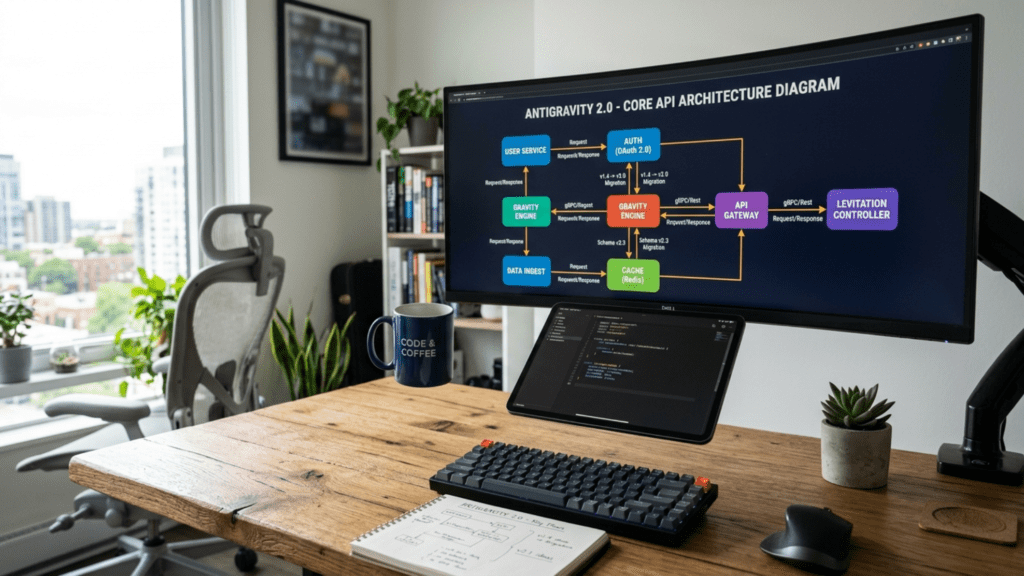
The Antigravity interface reimagines the traditional IDE layout. Instead of a single code editor, you’ll see:
The Orchestra View: A visual representation of all active agents, their current tasks, and inter-agent communications. Think of it as a real-time dashboard showing your AI development team at work.
Agent Panels: Each agent gets its own collapsible panel showing:
- Current task and progress
- Generated code preview
- Resource consumption metrics
- Communication logs with other agents
- Error states and recovery actions
The Conductor Terminal: Your primary control interface where you issue commands, set goals, and orchestrate agent behaviors using natural language or slash commands.
Practical Workflows and Examples
Building a Full-Stack SaaS Application
Let’s walk through creating a complete project management SaaS platform using Antigravity 2.0’s multi-agent system:
Step 1: Project Initialization
text/goal Create a project management SaaS with user authentication,
team workspaces, task boards, and real-time collaboration
Antigravity automatically spawns specialized agents:
- UI/UX Agent: Designs the interface and user flows
- Frontend Agent: Implements React components and state management
- API Agent: Builds RESTful or GraphQL endpoints
- Database Agent: Designs schema and optimization strategies
- Auth Agent: Implements secure authentication and authorization
- Testing Agent: Creates comprehensive test suites
Step 2: Parallel Development While the agents work simultaneously, you can monitor progress through the Orchestra View. The Frontend Agent might request specific API endpoints from the API Agent, triggering automatic negotiation protocols where they agree on data contracts without your intervention.
Step 3: Real-Time Adjustments As development progresses, you can redirect agents mid-task:
text/redirect frontend-agent Focus on mobile responsiveness for the task board
/enhance api-agent Add webhook support for third-party integrations
Managing Complex Agent Interactions
Agent Communication Protocols
Antigravity 2.0 implements a sophisticated message-passing system between agents. When the Frontend Agent needs an API endpoint that doesn’t exist, it automatically:
- Sends a specification request to the API Agent
- Waits for confirmation or negotiates changes
- Adapts its implementation based on the response
- Logs the interaction for your review
Conflict Resolution
When agents disagree (for example, on database schema design), Antigravity’s built-in arbitration system:
- Presents both approaches with pros/cons
- Allows you to make the final decision
- Learns from your choices for future projects
Advanced Features Deep Dive
Dynamic Subagent Architecture
Subagents aren’t just helper processes – they’re specialized micro-experts that handle granular tasks. For instance, when building a payment system:
Primary Payment Agent creates:
- Stripe Integration Subagent: Handles API implementation
- Security Audit Subagent: Reviews code for vulnerabilities
- Compliance Subagent: Ensures PCI DSS compliance
- Testing Subagent: Creates payment flow test scenarios
Each subagent maintains its own context and can spawn further subagents if needed, creating a hierarchical task decomposition system.
Scheduled Workflow Automation
The scheduling system goes beyond simple cron jobs. You can create intelligent automation sequences:
text/schedule daily at 9am
  - Review all PR comments
  - Generate implementation plans
  - Assign agents to approved tasks
  - Update project documentation
  - Send progress summary to Slack
Smart Scheduling Features:
- Conditional Execution: Run only if certain conditions are met
- Agent Load Balancing: Automatically adjusts based on available resources
- Failure Recovery: Implements retry logic with exponential backoff
- Dependency Management: Ensures tasks run in correct order
Voice-Driven Development
The voice command system understands context and technical jargon:
“Hey Antigravity, refactor the user service to use dependency injection, add comprehensive logging, and make sure all methods have proper error handling”
The system:
- Transcribes your request
- Identifies affected code sections
- Assigns appropriate agents
- Begins refactoring immediately
Voice Command Intelligence:
- Recognizes programming concepts and patterns
- Understands project-specific terminology
- Maintains conversation context across sessions
- Supports multiple languages and accents
SDK and CLI Power Features
Building Custom Agents with the SDK
The Python SDK enables creation of specialized agents for your specific needs:
Pythonfrom antigravity import Agent, AgentConfig, TaskResult

class DataMigrationAgent(Agent):
    def __init__(self):
        config = AgentConfig(
            name="Data Migration Specialist",
            capabilities=["sql", "etl", "validation"],
            max_parallel_tasks=5
        )
        super().__init__(config)

    async def execute_task(self, task):
        # Custom migration logic
        schema_analysis = await self.analyze_schema(task.source_db)
        migration_plan = await self.create_migration_plan(schema_analysis)

        # Spawn subagents for parallel processing
        validators = await self.spawn_subagents(
            count=3,
            type="ValidationAgent"
        )

        return TaskResult(
            success=True,
            artifacts=migration_plan,
            metrics=self.performance_metrics
        )
CLI Workflow Optimization
The Antigravity CLI transforms terminal-based development:
Bash# Launch a full development environment
antigrav init --template=nextjs-saas --agents=5

# Start specific agent configurations
antigrav agent start backend --model=gemini-3.5-flash --memory=persistent

# Execute complex workflows
antigrav workflow run integration-test --parallel --verbose

# Monitor agent performance
antigrav monitor --real-time --metrics=tokens,latency,accuracy
Performance Optimization Strategies
Token Budget Management
With multiple agents running simultaneously, token consumption can escalate quickly. Antigravity 2.0 provides intelligent resource management:
Automatic Optimization:
- Agents share context when working on related tasks
- Redundant processing is eliminated through smart caching
- Code generation uses incremental updates rather than full rewrites
Manual Controls:
text/limit frontend-agent 50000 tokens
/share-context api-agent database-agent
/cache-enable aggressive
Agent Performance Tuning
Different tasks benefit from different agent configurations:
High-Speed Development Mode:
- Fewer agents with more resources each
- Focused on rapid prototyping
- Accepts “good enough” solutions
Production Quality Mode:
- More specialized agents
- Emphasis on code quality and testing
- Multiple review passes
Enterprise Compliance Mode:
- Security-focused agents
- Audit trail generation
- Regulatory compliance checks
Troubleshooting and Best Practices
Common Issues and Solutions
Agent Deadlocks When agents wait on each other indefinitely:
- Use
/break-deadlockcommand to force resolution - Implement timeout policies in agent configurations
- Design clear task boundaries to prevent circular dependencies
Context Overflow When working on large codebases:
- Enable selective context loading
- Use subagents for isolated tasks
- Implement regular context cleanup cycles
Performance Degradation If agents slow down over time:
- Monitor token usage patterns
- Clear agent memory periodically
- Adjust parallel execution limits
Best Practices for Team Development
Agent Naming Conventions: Create clear, purposeful names for your agents:
auth-specialist-agentui-component-builderapi-endpoint-generator
Task Decomposition: Break complex features into agent-appropriate chunks:
- UI tasks → Frontend specialists
- Business logic → Backend architects
- Data operations → Database experts
Code Review Workflows: Implement multi-agent review processes:
- Implementation Agent creates code
- Review Agent checks for issues
- Security Agent validates safety
- Performance Agent optimizes
Integration with Existing Tools
IDE Plugins
Antigravity 2.0 offers plugins for popular IDEs that enable:
- Seamless code synchronization
- In-editor agent commands
- Real-time agent suggestions
- Hybrid manual/AI coding
CI/CD Pipeline Integration
Connect Antigravity to your deployment pipeline:
YAML# .antigravity/pipeline.yaml
stages:
  - name: pre-commit
    agents:
      - code-quality-checker
      - security-scanner

  - name: build
    agents:
      - build-optimizer
      - dependency-resolver

  - name: deploy
    agents:
      - deployment-orchestrator
      - monitoring-setup
Version Control Workflows
Antigravity generates atomic, well-documented commits:
- Each agent creates focused commits
- Automatic commit message generation
- Branch management strategies
- Conflict resolution assistance
Future-Proofing Your Development
Preparing for Agent-First Development
As AI agents become more capable, developers transition from coders to orchestrators. Key skills to develop:
Strategic Thinking: Focus on architecture and system design while agents handle implementation details
Quality Assurance: Become expert at validating AI-generated code and identifying edge cases
Agent Management: Learn to coordinate multiple AI workers effectively
Domain Expertise: Deep knowledge of your problem space becomes more valuable than syntax memorization
Building Agent-Native Applications
Design applications that leverage AI agents from the ground up:
- Modular architectures that agents can easily modify
- Clear interfaces between components
- Comprehensive test suites for validation
- Documentation that agents can understand and update
Conclusion
Google Antigravity 2.0 fundamentally changes how we approach software development. Instead of writing every line of code, you become a conductor orchestrating a symphony of specialized AI agents. This shift demands new skills and mindsets, but offers unprecedented productivity gains.
The key to success with Antigravity 2.0 lies not in fighting against the agent paradigm, but in embracing it fully. Learn to think in terms of agent capabilities, design workflows that maximize parallel execution, and focus your human expertise on the creative and strategic aspects that AI cannot yet master.
As you begin your journey with Antigravity 2.0, remember that you’re not just learning a new tool – you’re pioneering the future of software development. The projects you build today using agent orchestration will set the standards for tomorrow’s development practices.

![10 Benefits of the Internet of Things You Should Know [2025]](https://www.appstory.org/wp-content/uploads/2025/03/ATS-10-Benefits-of-the-Internet-of-Things-You-Should-Know-2025@2x.png)
 Tanish Patel
 United States
 United Kingdom
 India
India Canada
 Singapore


![10 Benefits of the Internet of Things You Should Know [2025]](https://www.appstory.org/wp-content/uploads/2025/03/ATS-10-Benefits-of-the-Internet-of-Things-You-Should-Know-2025@2x-80x60.png)