
 Tanish Patel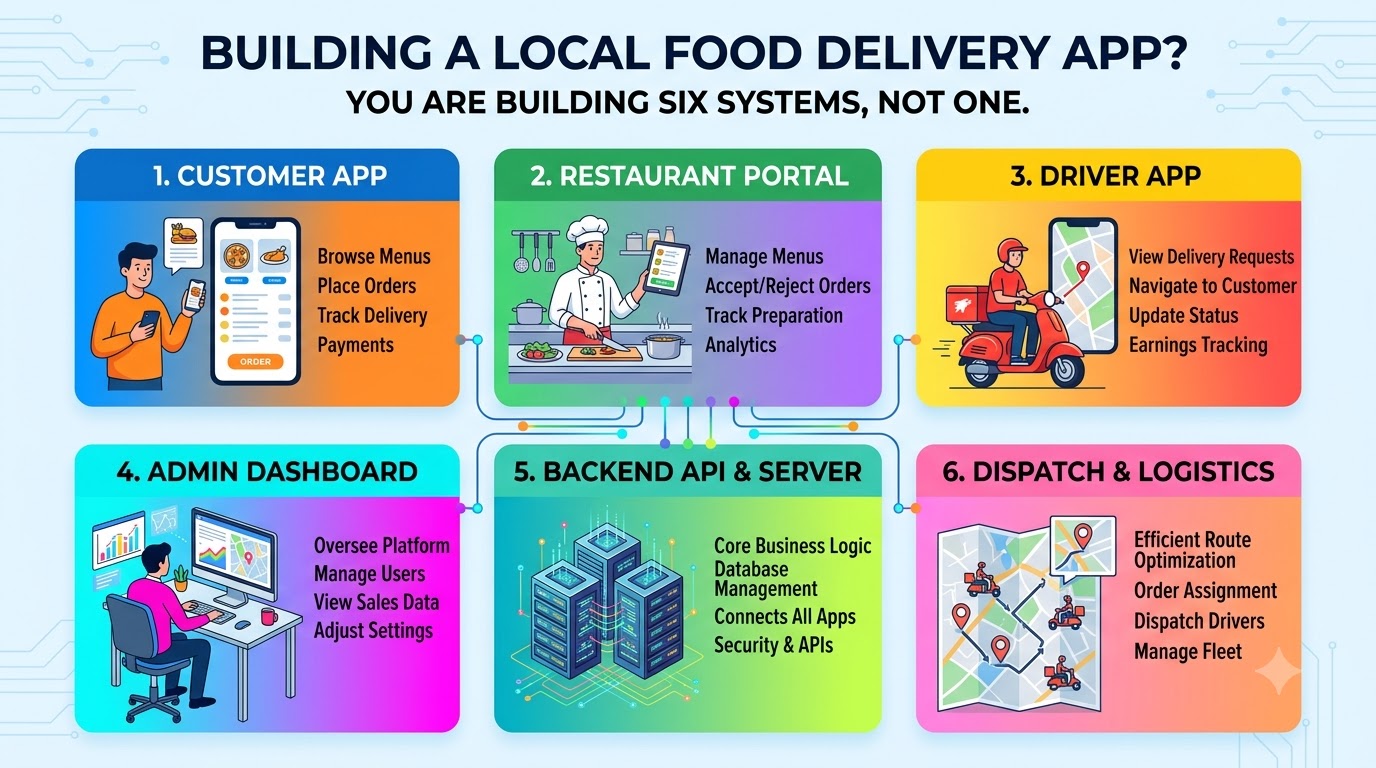
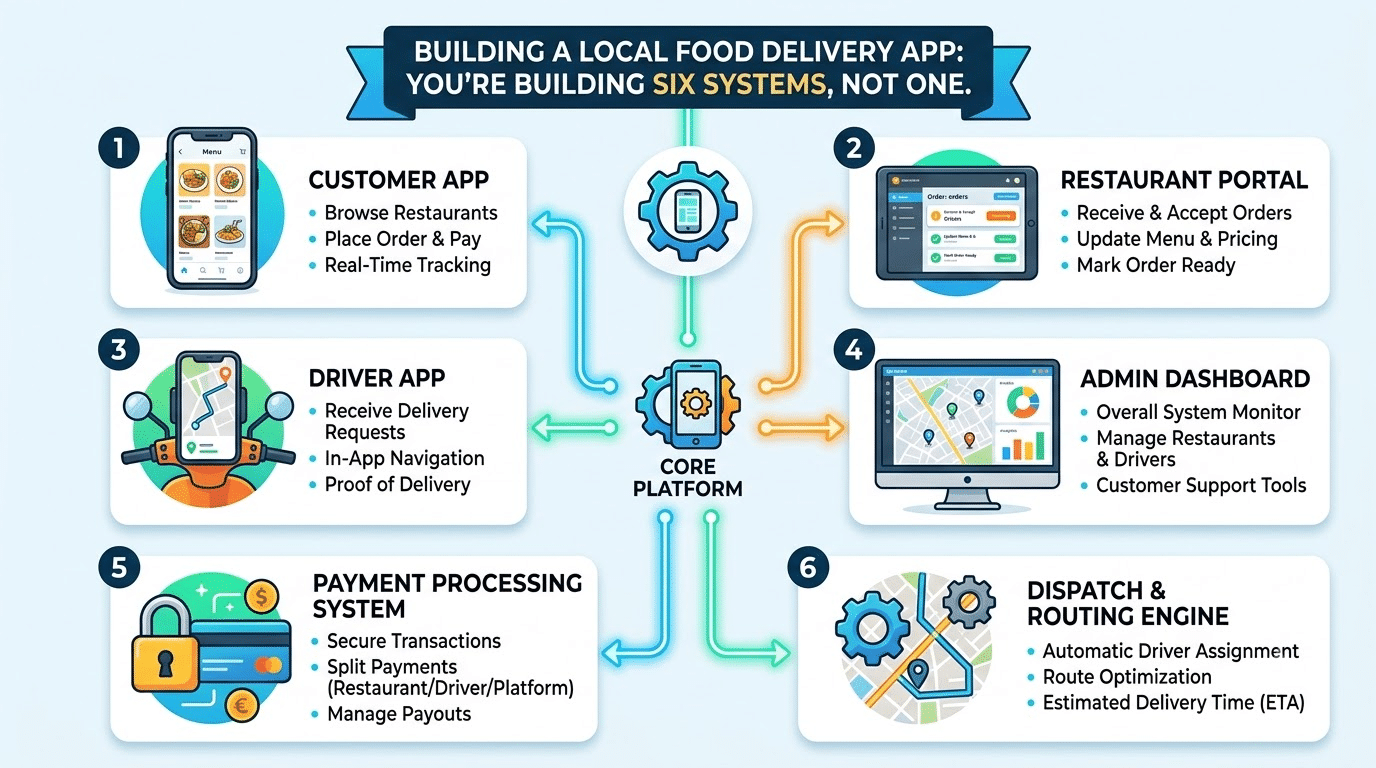
Most “cost and features” guides for delivery apps describe the screens a customer sees. The customer app is the part of a delivery business that is easiest to get right. This article shows how to find the other systems your business needs before you ask anyone for a quote, and which of them can wait until after launch.
When founders plan an on-demand grocery or food delivery app, the first question is almost always “how much does the app cost?” The usual answer is a feature list: search, product pages, cart, checkout, order tracking, push notifications, ratings. It is a reasonable list, and it describes about a sixth of what you will actually run.
The better question is: who touches an order between the moment it is placed and the moment it is handed over, and what does each of those people need in order to do their part without a phone call? Answer that honestly and the shape of the product changes. So does the budget.
What a real delivery marketplace looks like from the inside
For the last four years our team has been the engineering team behind Plodovi, a Croatian short supply chain marketplace that connects more than 130 local producers and family farms with households and delivers fresh produce from field to door within 24 to 48 hours. It started as a marketplace. What runs in production today is six connected systems:
- The public website, where shoppers browse producers and products, pick a delivery zone and place orders.
- The shopper portal, for order history, active deliveries, saved producers and addresses.
- The retailers platform, where producers manage listings, prices, availability and incoming orders.
- The delivery platform and a React Native driver app, which handle assignments, status updates and the handover itself.
- The admin application, the operations hub for catalogue, producer onboarding, order processing, delivery scheduling and zone configuration.
- A business intelligence dashboard for sales, producer performance and delivery efficiency.
Only the first two are what most people picture when they say “the app.” The other four are what let a small operations team run the business without drowning.
This is not peculiar to food. When we digitalised MOVE & MEET, a London social fitness community that had been running events from spreadsheets, the result was four systems: a website, a cross-platform mobile app, a back office and a partner dashboard for brands. The customer app was the one people saw. The back office was the one that let the team stop copying names between spreadsheets.
Every audience needs its own surface
A delivery marketplace has at least four audiences, and each of them wants something different from the same order:
| Audience | What they need from an order | What happens if you give them nothing |
|---|---|---|
| Shopper | Confidence it will arrive, and when | Support calls and refunds |
| Producer or vendor | What to prepare, by when, and a way to say “I am short” | Missing items discovered at pickup |
| Driver | The next stop, what to hand over, and a way to report a problem | Paper manifests and phone calls to the office |
| Operations team | Every order that needs a decision right now | A shared spreadsheet and a group chat |
The last column is the important one. Each gap gets filled by a person with a phone, a spreadsheet or a messaging app. That works at ten orders a day. At a few hundred it is somebody’s full-time job, and nobody put it in the budget because nobody wrote it down as a feature.
Order state is the product
The piece that ties all six systems together is not a screen. It is the order, and in a local food marketplace an order is less stable than it looks. A farmer harvests less than expected. A crate fails a quality check. An item is marked unavailable an hour before pickup. The shopper ordered five things; four will arrive.
That means the order cannot be a single status field that goes from “paid” to “delivered.” Each line needs its own state, owned by whoever is responsible for it at that moment:
// One order, many lines, each with its own owner and history.
type LineStatus =
  | 'ordered'      // shopper placed it
  | 'confirmed'    // producer committed to supply it
  | 'short'        // producer can supply less, or none
  | 'picked_up'    // driver has it
  | 'handed_over'  // customer has it
  | 'refused'      // customer declined it at the door
  | 'refunded';    // money went back

interface OrderLine {
  productId: string;
  quantityOrdered: number;
  quantitySupplied: number | null; // set by the producer, not guessed
  status: LineStatus;
  changedBy: 'shopper' | 'producer' | 'driver' | 'operations';
  reason?: string;                  // required for short, refused, refunded
}
This small model settles a lot of product questions early. The producer portal exists to move lines from ordered to confirmed or short. The driver app exists to move them to picked_up, handed_over or refused, with a reason. The admin application exists to handle everything that does not follow the happy path. And the shopper is told about a shortfall before the van arrives, not at the door.
Once line-level state exists, logistics can be built on top of it: grouping orders by zone and delivery cycle, assigning drivers, and recomputing the plan when a producer cancels. We have written separately about how we design batching and driver assignment for perishable deliveries, so here it is enough to say that none of it works if the order is a single status field.
A rule for deciding what to build before launch
You do not need all six systems on day one. You need to know which of them you are postponing, and what will do their job in the meantime. For every audience in the table above, ask three questions:
- How many times per delivery cycle does this person act on an order? Once a day is spreadsheet territory. Once per order, repeated across dozens of orders, is software territory.
- What does a mistake cost? A wrong address in the delivery run costs a failed handover, a refund and often a customer. A typo in a weekly sales report costs almost nothing.
- Can one named person absorb this work by hand for three months? If the answer is yes, write down who that person is, and plan the system for later. If nobody can, it is a launch requirement.
Applied to a local food marketplace, the answer is usually:
- Build before launch: the shopper-facing website or app, the producer confirmation flow (even if it starts as a single screen), a minimal admin view of orders by state, and some way for drivers to record handovers and exceptions.
- Build soon after launch: a proper driver app. A dedicated app is worth it as soon as drivers work in patchy signal or handle more than a handful of stops, because an admin panel on a phone assumes a keyboard, a large screen and a connection, and a van has none of those.
- Build when the data exists: analytics dashboards, route optimisation, recommendations.
What we would not build on day one
The negative list is where most of the savings are, and where most feature-list articles are silent.
Route optimisation algorithms. Start with plain rules that a dispatcher can predict and override: zone, vehicle, shift, current load. An optimiser needs real data on how long each stop actually takes, and before launch you do not have it.
A business intelligence dashboard. Plodovi has one today and it earns its place, because four years of orders, producers and deliveries give it something to say. In the first months a few saved queries and a weekly export answer the same questions for a fraction of the effort.
Automatic decisions that are only right on average. At Plodovi we built automatic substitution: when a producer could not fill a line, the system picked the nearest equivalent product. It was technically reasonable and commercially wrong, because a buyer who chose a specific farm’s product did not want another farm’s, even at the same price and quality. We reverted it. Today the system suggests a substitute and the shopper or an admin accepts it.
In-app chat. It is the feature that sounds most natural and it was the most contested cut when we rebuilt the MOVE & MEET app. Chat brings moderation, notifications, retention rules and abuse reporting into version one, and in a delivery business it also becomes a place where orders are changed off the record. Structured reasons on each order line, as in the model above, answer most of what chat would be used for.
How to read a quote for a delivery app
With this in mind, you can read any quote from an agency or a freelancer in a few minutes.
- Does it name each audience separately? If the quote lists only customer screens, the producer, driver and operations sides are either missing or hidden inside a vague “admin panel” line.
- Does it describe what happens when an item is short? If nobody has asked you that question, nobody has designed for it.
- Does it say what is deliberately postponed? A good proposal names the systems it is not building yet and what will cover them until then. A proposal that includes everything is either very expensive or very optimistic.
- Who owns the order data? All six systems read and write the same orders. If each part is built on a different off-the-shelf tool, someone will spend their evenings reconciling them.
Where to start on Monday
Before you ask anyone for a price, draw one order’s journey on a single page. Write down every person who touches it, how many times per delivery cycle they act, and what they use to do it today. Every step that depends on a phone call or a shared spreadsheet is a system you are either building now or consciously postponing. Put both lists in your brief. The quotes you get back will be comparable, and the app you launch will be one you can actually operate.
About the author
Filip Lauc is the CEO and fractional CTO at Jaspero, a software development agency in Osijek, Croatia, building AI integrations, automations and custom business systems since 2014.

 Ashish Sudra
![10 Benefits of the Internet of Things You Should Know [2025]](https://www.appstory.org/wp-content/uploads/2025/03/ATS-10-Benefits-of-the-Internet-of-Things-You-Should-Know-2025@2x.png)
 Tanish Patel
 United States
 United Kingdom
 India
India Canada
 Singapore


![10 Benefits of the Internet of Things You Should Know [2025]](https://www.appstory.org/wp-content/uploads/2025/03/ATS-10-Benefits-of-the-Internet-of-Things-You-Should-Know-2025@2x-80x60.png)


