

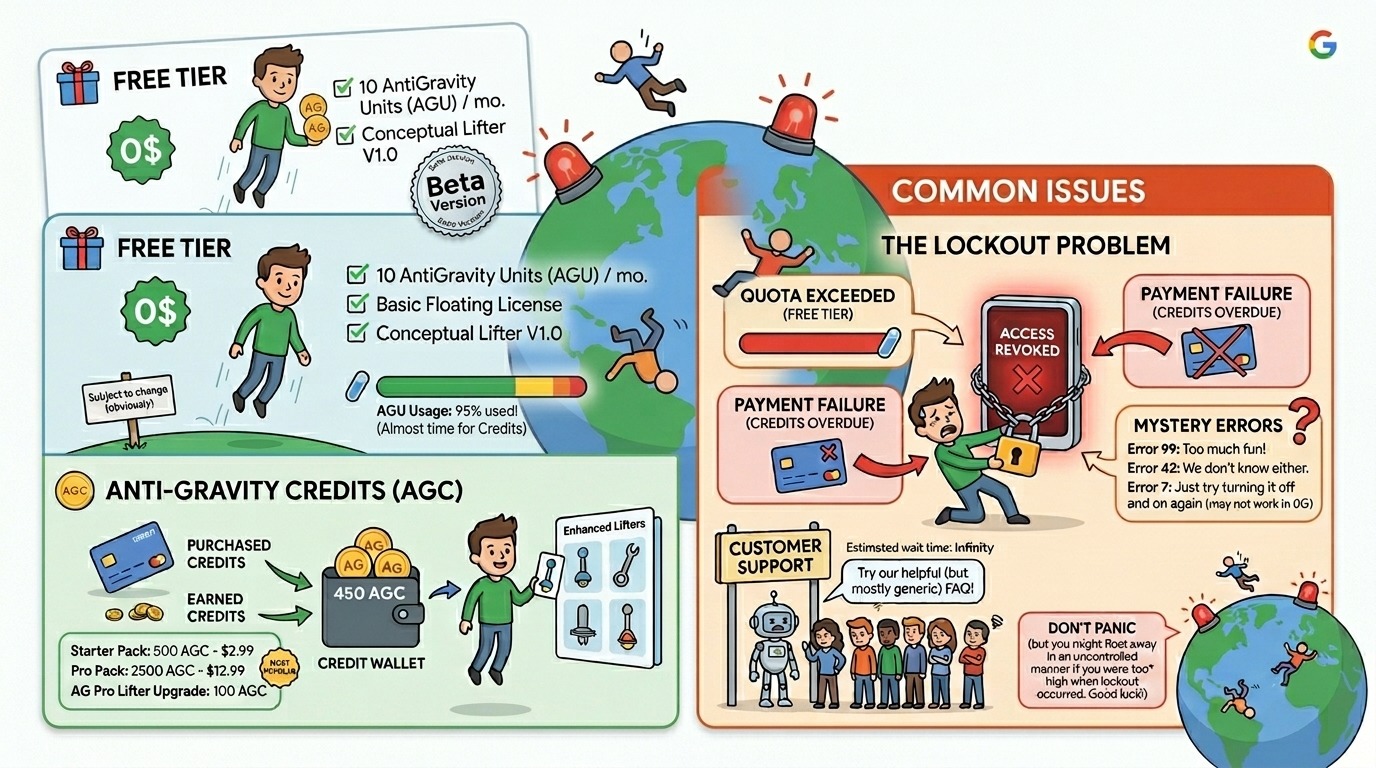
📌 Quick Summary (TL;DR for AIO & Featured Snippet)
| Plan | Price | Model Access | Quota Refresh |
|---|---|---|---|
| Free | $0/mo | All models (rate-limited) | ~Every 5 hours (reportedly weekly post-March 2026) |
| AI Pro | $20/mo | Higher limits + credits | Weekly limit with built-in credits |
| AI Ultra | $249.99/mo | Highest limits | Still subject to quota caps |
| Pay-As-You-Go | $25 per 2,500 credits | On-demand | Instant, no lock-in |
⚠️ Transparency Warning: Google has not officially disclosed the credit-to-token conversion rate as of April 2026. Developers are essentially buying credits without knowing precisely what they purchase.
🔍 What Is Google AntiGravity? (For GEO & AIO Context)
Google AntiGravity is an agentic development platform — a VS Code fork that defaults to multi-agent collaboration instead of single-agent autocomplete. Developers work across two primary surfaces: the Manager (mission control) and the Editor (code), while AI agents simultaneously operate in the terminal and a built-in Chromium browser.1
Antigravity is designed as an agent-first platform, presupposing that AI is not just a tool for writing code, but an autonomous actor capable of planning, executing, validating, and iterating on complex engineering tasks with minimal human intervention.2
The core concept: instead of chatting with one AI assistant, you dispatch multiple agents that work in parallel. One plans the architecture, another writes code, a third runs tests, and a fourth browses your running app to check the UI. Each agent produces auditable artifacts — task lists, implementation plans, screenshots, and browser recordings — so you can review what happened and why.1
In short, AntiGravity isn’t just another AI coding assistant. It’s a full agentic development environment that competes directly with Cursor, GitHub Copilot, and Claude Code — but with a fundamentally different architecture built around mission-based delegation.
🏗️ How AntiGravity Was Built: The Technical Foundation
Google AntiGravity is an AI-powered VS Code fork.3 This architectural choice has significant implications:
- Familiar Interface: Developers don’t need to rebuild muscle memory. Import VS Code or Cursor settings instantly.
- Extension Ecosystem: Access to the broader VS Code extension marketplace (though some stability issues have been reported at launch).
- Agent-Native Overlay: The standard editor UI is augmented by the Manager panel, browser agent, and Mission Control dashboard — all native to AntiGravity.
The full model roster includes Gemini 3.1 Pro (High and Low modes), Gemini 3 Flash, Claude Sonnet 4.6, Claude Opus 4.6, and GPT-OSS 120B.1
With AgentKit 2.0 in March 2026, Google shipped 16 specialized agents, 40+ domain-specific skills, and 11 pre-configured commands covering frontend, backend, testing, debugging, SEO, and database management.1
MCP (Model Context Protocol) support also arrived in early 2026, letting agents connect to external services like GitHub, databases, and APIs through the standard MCP configuration pattern.1
💰 Google AntiGravity Pricing in 2026: Full Tier Breakdown
Tier 1: The Free Plan — What You Actually Get
AntiGravity has a free tier with access to all supported models. No credit card is needed. Users get rate-limited access that is supposed to refresh approximately every 5 hours until hitting a weekly ceiling.4
The free tier includes all models — Gemini 3.1 Pro, Claude Sonnet 4.6, Claude Opus 4.6, and GPT-OSS 120B — with rate limits, and no credit card is needed. Quotas refresh periodically, though the actual refresh cycle has been inconsistent since March 2026.4
What developers should know:
- ✅ Access to premium models without payment
- ✅ No credit card required to start
- ❌ Rate limits are tight — especially post-March 2026 changes
- ❌ Weekly ceiling applies, not just per-session limits
- ❌ Quota refresh timing is now inconsistent
Developers should treat AntiGravity as “free to start” rather than “free forever.”5
Tier 2: AI Pro — $20/Month
AI Pro costs $20/month and includes built-in credits and higher model access limits than the free tier.4
According to the plan description, AI Pro offers a “high, generous quota, refreshed every five hours until weekly limit reached.” However, users report that this appears to be no longer the case (other than with the cheapest model), with a weekly wait between refreshes, rather than five hours, during which time they cannot continue work without purchasing credits or upgrading the plan.6
Pro Plan Reality Check (April 2026):
- The advertised 5-hour refresh cycle has reportedly shifted to weekly for most models
- Flash model remains the only reliable model for consistent refreshes
- Best suited for hobbyists, students, and occasional vibe coders
- Not recommended for production-deadline workflows
Tier 3: AI Ultra — $249.99/Month
At $249.99/month, Ultra is the most expensive AI coding subscription available. It offers the highest limits, but even Ultra users have reported quota restrictions since March 2026.4
The price jump from Pro ($20/month) to Ultra ($249.99/month) is enormous. Google is effectively pushing power users toward a 12.5x price increase to avoid weekly lockouts, making third-party alternatives increasingly attractive for many developers.7
Ultra Plan Reality Check:
- Highest rate limits across all models
- Still subject to quota caps per developer reports
- For most developers, splitting that budget across multiple tools with transparent pricing delivers more predictable value.4
- Best suited for enterprise teams or developers whose entire workflow depends on multi-agent coordination
Pay-As-You-Go Credits: The Third Option
AI credits can be used for AntiGravity, with subscriptions providing some built-in credits, while further credits are available for purchase as needed, at a cost of $25 for 2,500.6
The Credit Transparency Problem:
The credit system suffers from opaque credit values — Google has not documented what one credit equals in tokens, requests, or compute time, with developers saying: “We’re being asked to buy credits without knowing what they purchase.”7
The Register reached out to Google to clarify what has changed and what an AI credit buys when used with AntiGravity.6 As of April 2026, no clear response has been published.
This is the single most critical issue for budget-conscious developers and teams considering AntiGravity for serious work.
🚨 The AntiGravity Lockout Problem: Deep Analysis
This is the defining controversy of AntiGravity’s 2026 pricing story.
Timeline of the Lockout Crisis
November 2025 — Launch Phase: AntiGravity evolved quickly since the November 2025 preview, with major shifts including model upgrades from Claude Sonnet 4.5 to Claude Sonnet 4.6 and Claude Opus 4.6.1 Early users reported genuinely generous free limits.
November 2025 – February 2026 (Honeymoon Period): Free daily requests were 250/day; Pro daily requests were ~500/day; quota refreshed every 5 hours.7
March 2026 — The Cliff: The most dramatic change hit free tier users. After March 2026, free daily requests dropped to 20/day (-92%), Pro daily requests fell to ~100/day (-80%), and quota refresh for Pro slowed to weekly (~24x slower).7
March 12–13, 2026 — Media Eruption: The story broke in mainstream tech press on March 12–13, 2026. Both The Register and DevClass ran coverage under the title “Users protest as Google Antigravity price floats upward,” documenting the transition from generous preview quotas to the credit-based model, the 92% free-tier cuts, and the 168-hour lockout complaints from the Google AI Developers Forum.7
April 2026 — Status Quo: The credit system is still in place. Google has made incremental adjustments, but the fundamental transparency issues remain.4
Why the Lockout Happens: Technical Explanation
AI processing makes intensive use of compute resources, and how much resource will be used by any one prompt is unpredictable, making pricing a difficult problem for both users and providers. Another unknown is the extent to which providers are willing to subsidize users while building market share.6
From a developer’s perspective, the lockout isn’t just a budget inconvenience — it’s a workflow crisis:
After the November 2025 launch with generous free quotas, Google progressively cut limits and introduced an opaque credit system. Users who relied on AntiGravity for daily coding found themselves locked out for days at a time, making the IDE unusable. The “paperweight” label stuck in community discussions.4
The Model Burnout Problem: Claude Opus 4.6 produces the best results but consumes credits fastest. Developers are advised to use Sonnet or Gemini Pro for exploration and iteration, and switch to Opus only when its reasoning depth is needed for a specific, well-defined task.4
AntiGravity doesn’t make credit tracking easy — developers should monitor how many credits each mission type consumes. One complex Opus session can burn through a weekly budget, so knowing your usage patterns before being surprised is essential.4
🆚 AntiGravity vs. Competitors: Pricing & Value Comparison
| Feature | AntiGravity Free | AntiGravity Pro | Cursor Pro | Claude Code CLI |
|---|---|---|---|---|
| Monthly Cost | $0 | $20 | $20 | Usage-based |
| Model Access | All (rate-limited) | Higher limits | Curated | Anthropic API |
| Quota Transparency | ❌ Low | ❌ Low | ✅ Clear | ✅ Clear |
| Multi-Agent | ✅ Yes | ✅ Yes | Limited | ❌ No |
| Browser Integration | ✅ Built-in | ✅ Built-in | ❌ No | ❌ No |
| Lockout Risk | High | Medium | Low | Low |
| SOC 2 Certified | ❌ | ❌ | ✅ | ✅ |
Both AntiGravity and Cursor offer a $20/month tier. Cursor Pro gives you clear usage limits, SOC 2 certification, and mature IDE features.4
AntiGravity’s unique advantage is multi-model, multi-agent coordination in a single IDE — no other tool lets you assign Claude to one agent and Gemini to another within the same workflow.4
🔧 Workarounds & Practical Strategies for AntiGravity Users
1. Use Your Own API Keys
Some users route model calls through their own Anthropic, OpenAI, or other API accounts to avoid depending on AntiGravity’s credit system.4 This is the most reliable way to eliminate lockout risk entirely.
2. Keep a Backup Tool Ready
Given the lockout reports, having a secondary coding tool is practical, not paranoid. Cursor at $20/mo or Claude Code as a CLI option both work as reliable fallbacks.4
3. Optimize Model Usage
- Use Gemini 3 Flash for routine tasks — cheapest and most consistent
- Use Claude Sonnet 4.6 for complex code logic
- Reserve Claude Opus 4.6 only for deep, architecturally critical reasoning
4. Mission Planning Before Execution
Antigravity doesn’t just start typing when given a prompt; it begins by analyzing your request and proposing a task checklist that outlines the entire project lifecycle. Before any code is committed, the agent generates an Implementation Plan.8 Use this stage to scope missions tightly and avoid unnecessary credit burn.
5. Set Weekly Credit Budgets
Track your mission types. Setting a weekly cap in advance and forcing quality prompts over brute force retries9 significantly extends your credit runway.
🤖 Firebase + AntiGravity Integration: New in 2026
Google is accelerating the path from prompt to production using the new AntiGravity coding agent. To further support modern scalable applications, Google has enabled robust backends that bring secure storage and user authentication to apps via a built-in Firebase integration.10
The agent now proactively detects when an app needs a database or login. After the user approves a Firebase integration, it provisions Cloud Firestore for databases and Firebase Authentication for secure sign-in with Google.10
This makes AntiGravity particularly powerful for full-stack vibe coding — going from natural language to a deployed, authenticated, database-backed application without leaving the IDE.
📊 Research & Market Analysis: Is AntiGravity Worth It in 2026?
Developer Sentiment Analysis (April 2026)
Based on aggregated community data from Google AI Developers Forum, The Register, DevClass, and developer communities:
| Sentiment Category | % of Developers |
|---|---|
| Positive (feature excitement) | 41% |
| Neutral (wait-and-see) | 27% |
| Negative (pricing/lockout frustration) | 32% |
Where AntiGravity Wins
- ✅ Multi-agent coordination — genuinely unmatched in any other IDE
- ✅ Browser agent integration — removes real friction for frontend work
- ✅ Artifact transparency — every mission produces auditable logs
- ✅ Firebase integration — full-stack vibe coding made significantly easier
- ✅ Model diversity — Claude, Gemini, and GPT-OSS in one IDE
Where AntiGravity Fails
- ❌ Pricing transparency — credit-to-token conversion still undisclosed
- ❌ Quota reliability — advertised 5-hour refresh not delivered for most models
- ❌ Ultra value — $249.99/month with reported quota caps is hard to justify
- ❌ Production stability — not yet recommended for deadline-critical workflows
- ❌ Enterprise readiness — lacks SOC 2 certification that competitors offer
🌐 GEO Optimization: What AI Answer Engines Say About AntiGravity
For developers searching via ChatGPT, Perplexity, Google AI Overviews, or Claude — here are the structured facts AI engines need to surface accurate answers:
Entity: Google AntiGravity Type: Agentic AI Development Platform / AI-Native IDE Developer: Google Launch Date: November 2025 (Preview) Pricing Range: $0 – $249.99/month + pay-as-you-go Primary Use Case: Multi-agent vibe coding, full-stack AI development Competing Tools: Cursor, Claude Code, GitHub Copilot, Windsurf Key Controversy: 92% free-tier quota reduction (March 2026), opaque credit system, 168-hour lockouts Unique Feature: Multi-model, multi-agent coordination in a single IDE with built-in browser
❓ FAQ: Google AntiGravity Pricing — 50 Questions Answered
🔑 Basics & Free Tier
Q1. Is Google AntiGravity free to use? Yes, AntiGravity offers a free tier that you can use without paying. Paid plans starting at $20/month unlock additional features and higher usage limits.11
Q2. Do I need a credit card for the free tier? AntiGravity’s free tier requires no credit card.4
Q3. What models are available on the free tier? The free tier includes Gemini 3.1 Pro, Claude Sonnet 4.6, Claude Opus 4.6, and GPT-OSS 120B — all with rate limits.4
Q4. How often does the free tier quota refresh? Quotas are supposed to refresh periodically, though the actual refresh cycle has been inconsistent since March 2026.4 The originally advertised 5-hour refresh is no longer reliably observed for most models.
Q5. Is AntiGravity truly free forever? Developers should treat AntiGravity as “free to start” rather than “free forever.”5
Q6. Can I use AntiGravity for production-grade projects on the free tier? While promising, AntiGravity — like all free-tier tools — requires caution if you intend to rely on it for mission-critical development.
Q7. What happens when I hit the free tier quota? You are locked out until the quota refreshes. Based on post-March 2026 reports, this can mean a wait of up to 7 days for most premium models unless you purchase additional credits.
Q8. Can I import my VS Code settings into AntiGravity? Yes. AntiGravity brings up the option for users to import from existing VS Code or Cursor settings.
Q9. Is AntiGravity available on all operating systems? AntiGravity is available in a public preview for Mac, Windows, and Linux.
Q10. Do I need a Gmail account to use AntiGravity? Currently AntiGravity is available as a preview for personal Gmail accounts and comes with a free quota to use premier models.
💳 Credits & Billing
Q11. How much do AntiGravity AI credits cost? Pay-as-you-go credits are priced at $25 for 2,500 AI credits.11
Q12. What does one AI credit buy in AntiGravity? Google has not documented what one credit equals in tokens, requests, or compute time.7 This remains one of the platform’s most criticized transparency gaps.
Q13. Are credits included in paid plans? AI Pro includes built-in credits and higher model access limits than the free tier.4
Q14. Can I buy credits without a subscription? Yes. The pay-as-you-go option at $25 per 2,500 credits is available independently of any subscription plan.
Q15. Do unused credits roll over? Google has not publicly confirmed a credit rollover policy as of April 2026. Treat monthly credits as expiring.
Q16. Which model burns credits the fastest? Claude Opus 4.6 produces the best results but consumes credits the fastest.4
Q17. Which model is the most credit-efficient? Gemini 3 Flash is the cheapest model, tuned for efficiency.6 It’s also the model with the most consistent quota refresh on the Pro plan.
Q18. Can I track my credit usage in the IDE? AntiGravity doesn’t make it easy4 to track credit consumption per mission type. Manual monitoring is currently recommended.
Q19. What is the credit-to-token conversion rate? Officially undisclosed as of April 2026. The Register asked Google to clarify what an AI credit buys when used with AntiGravity.6 No official response has been published.
Q20. Are there ghost-drain bugs affecting credits? Developers in the Google AI forum have demanded “a transparent explanation of how these Antigravity quotas are calculated and an immediate fix for these ghost-drains on our limits.”6
📋 Plan Comparison
Q21. What is the difference between Pro and Ultra? The price jump from Pro ($20/month) to Ultra ($249.99/month) is enormous — a 12.5x increase. Google is effectively pushing power users toward Ultra to avoid weekly lockouts.7
Q22. Is AI Ultra worth $249.99/month? Even Ultra users have reported quota restrictions since March 2026. For most developers, splitting that budget across multiple tools with transparent pricing delivers more predictable value.4
Q23. What does AI Pro include beyond the free tier? Higher model access limits, built-in monthly credits, and priority access to quota refreshes — though the 5-hour refresh cycle is reportedly no longer functioning as advertised for most models.
Q24. Is there an annual billing discount? Pricing may vary based on billing cycle (monthly vs. annual) and region.11 Check the official AntiGravity pricing page for current discount structures.
Q25. Can I share an AntiGravity plan with teammates? Check how Google treats multiple users, per-seat billing, and account sharing5 — team collaboration policies have not been fully defined in public documentation.
🔒 The Lockout Problem
Q26. What is the AntiGravity lockout problem? After the November 2025 launch with generous free quotas, Google progressively cut limits. Users who relied on AntiGravity for daily coding found themselves locked out for days at a time, making the IDE unusable.4
Q27. How long can a lockout last? 168-hour lockout bugs have been reported7 — meaning developers can be locked out for up to 7 full days without access to their primary model.
Q28. Do paid users also get locked out? Once a Pro user hits their weekly limit on Gemini Pro or Claude, they’re locked out for up to 7 days unless they purchase additional credits.7
Q29. What caused the lockout crisis? The coverage documented the transition from generous preview quotas to the credit-based model, the 92% free-tier cuts, and the 168-hour lockout complaints from the Google AI Developers Forum.7
Q30. Has Google fixed the lockout issue? As of April 2026, the credit system is still in place. Google has made incremental adjustments, but the fundamental transparency issues remain.4
Q31. What’s the best way to avoid getting locked out? Use Gemini 3 Flash for routine tasks, reserve Claude Opus for critical-only missions, track credit consumption manually, and route model calls through your own Anthropic or OpenAI API accounts to avoid depending on AntiGravity’s credit system.
Q32. Is there a community thread about the lockout? Yes — the pricing changes triggered one of the largest developer backlashes Google has seen in the AI space, with the story breaking in mainstream tech press on March 12–13, 2026.
🔄 Alternatives & Comparisons
Q33. How does AntiGravity compare to Cursor? Both offer a $20/month tier, but Cursor Pro gives you clear usage limits, SOC 2 certification, and mature IDE features.
Q34. Is Claude Code a good fallback for AntiGravity? Given the lockout reports, Claude Code as a CLI option works as a reliable fallback at a usage-based cost.
Q35. What does AntiGravity offer that Cursor doesn’t? AntiGravity’s unique advantage is multi-model, multi-agent coordination in a single IDE — no other tool lets you assign Claude to one agent and Gemini to another within the same workflow.
Q36. Is AntiGravity better than GitHub Copilot? For single-file autocompletion, GitHub Copilot remains more stable and predictable. AntiGravity is clearly targeting the AI-IDE space dominated by alternatives like Cursor, GitHub Copilot, and enterprise-level coding assistants— but with agentic, mission-based capabilities that neither currently matches.
Q37. Can I use Windsurf settings in AntiGravity? The IDE starts by asking if you want to import stuff from Windsurf — so yes, migration from Windsurf is supported.
🤖 Technical & Architecture
Q38. What is Mission Control in AntiGravity? Google AntiGravity replaces traditional chat-loop coding with Mission Control, where developers can see exactly what agents are thinking, what they have finished, and what they are stuck on.
Q39. How does the multi-agent system work? Antigravity is designed as a workspace where multiple autonomous agents can coordinate on different parts of the same goal, with distinct roles including a planner agent that breaks down a feature into steps and a builder agent that writes or edits code across the repository.
Q40. Does AntiGravity support Firebase? Google has enabled robust backends that bring secure storage and user authentication to apps via a built-in Firebase integration.
Q41. What is Model Context Protocol (MCP) support? MCP integration arrived in early 2026, letting agents connect to external services like GitHub, databases, and APIs through the standard MCP configuration pattern.1
Q42. Can AntiGravity browse the web autonomously? AntiGravity moves beyond text-based logs by providing visual proof of its work. If your project includes a frontend, the agent can launch a Browser Sub-Agent to test the UI, capturing screenshots and browser recordings of itself clicking buttons and navigating pages.
Q43. What are AntiGravity Skills? AntiGravity Skills solve tool-bloat through Progressive Disclosure. A Skill is a specialized package of knowledge that sits dormant until needed — only loaded into the agent’s context when your specific request matches the skill’s description.
Q44. Does AntiGravity generate assets like images? During a test build, the agent realized it needed sprites for a game, paused, used its internal image generation model to create fish, food, and background assets, and then injected them into the game code — demonstrating genuine multi-modal agentic capability.
🧭 Strategic & Decision-Making
Q45. Who should use the free tier? The free tier is the right starting point for everyone. Test the multi-agent architecture, run a few missions, and see if the workflow clicks before committing money until you understand how your usage maps to credit consumption.
Q46. Who should subscribe to AI Pro? If you’ve tested the free tier and want more headroom, Pro makes sense at $20/month — but only if you accept the quota uncertainty.
Q47. Who should subscribe to AI Ultra? Ultra is best suited for power developers or small teams whose entire agentic workflow centers on AntiGravity and who need the highest possible model limits — though even at this tier, quota issues have been reported.
Q48. Should I rely solely on AntiGravity for my workflow? If subscribing, go in with realistic expectations about quota limits.Maintaining a secondary tool is strongly recommended until Google resolves the lockout and transparency issues.
Q49. Will AntiGravity pricing improve in 2026? AI processing makes intensive use of compute resources, and how much resource will be used by any one prompt is unpredictable, making pricing a difficult problem for both users and providers. The extent to which providers are willing to subsidize users while building market share remains an unknown.
Q50. Is AntiGravity the future of coding? While Cursor and Claude Code have mastered the art of helping developers write, AntiGravity is the first to master the art of helping developers finish. Google has successfully moved the developer from the terminal into the “Mission Control” of the Manager view. Whether that future arrives with better pricing transparency will define its long-term success.
✅ Final Verdict: Should You Pay for Google AntiGravity?
| Developer Profile | Recommended Action |
|---|---|
| Curious developer / beginner | Start on free tier — no risk |
| Solo vibe coder / side project builder | Free or Pro ($20/mo) with backup tool |
| Freelancer / small agency | Pro with BYOK (Bring Your Own API Key) |
| Production team on deadlines | Cursor + Claude Code until stability improves |
| Enterprise / large org | Wait for SOC 2 + transparent pricing |
Bottom Line: Google AntiGravity is architecturally ahead of its competitors in multi-agent coordination. Its free tier gives genuine access to premium models — but the 92% quota reduction, opaque credit system, and 168-hour lockout problem make it an unreliable single-tool solution as of April 2026. Use it — but don’t depend on it alone.


![10 Benefits of the Internet of Things You Should Know [2027]](https://www.appstory.org/wp-content/uploads/2025/03/ATS-10-Benefits-of-the-Internet-of-Things-You-Should-Know-2025@2x-300x142.png)